Update: The $10 offer is now closed, the theme can be purchased for $17 for a few days before we set the final price.

At last the third in the Multiple Streams Themes trilogy is complete, together with two plugins – Ads Manager and Redirection.
As usual I’ve decided to release a few copies on pre-order at $10 because it’s always a good idea to “seed the market”.
And in my constant pursuit of getting you the best deal, you’ll be getting a brand new premium theme, and also TWO plugins for just $10 in total.
Yep, to make it a sweeter deal, we’ve included our brand new unreleased Redirection plugin, as well as the Ads Manager plugin which we included with the two previous themes.
It’s very useful for creating links that look like they’re to a page on your blog, but that actually redirect your visitor somewhere else…
Get it? Do you? Good isn’t it? 😉

For this brand new theme we listened and we added in the features you asked for and then included a couple more we knew you’d love.
(Like WP 3 Custom Header support and multiple Page Templates…)
It has all the regular features from the previous two themes, packaged in a very attractive new design.
For 48 hours, I’m releasing just 50 copies at $10.
By including the new Redirection plugin (and also Ads Manager) I think you’ll agree this is a VERY appealing bundle. 😉
All of the Multiple Streams Themes are designed and built to do two things for you.
- Enable you to earn you more money from your blog more easily.
- Give you more control over your blog appearance.
This newest theme was originally designed for my own personal use across several sites and wasn’t ever intended to go public, but it’s so nice I decided to share it instead.
Let’s go through some of the new features.
Multiple Sidebars
In order to give you as much control as possible and make it as flexible as possible, we built FOURTEEN sidebars into the theme. Because everybody’s different and because we know you like to do things your way, we’ve given you the choice of lots of sidebars to use to make your site look the way you want it to.
Three feature boxes which in order, firstly help you to get more subscribers, secondly make it easy for visitors to see what you’ve been writing about recently, and thirdly, get more subscribers (again).
Followed by a full width horizontal ad area, then FOUR sidebars to give you plenty of choice of which ad you want to show and where, followed by a full width horizontal footer ad, and finally FOUR very classily presented footer sidebars with the very last sidebar at the bottom for a footer menu.
I don’t know of any other commercial themes that give you so much choice.
Custom Headers
By popular request we’ve built this theme to support the new “Custom Header” feature which was added in WordPress 3.0. Apart from the default blue shaded header, in the admin panel under the “Appearance >> Header” menu you’ll see six alternative shaded headers you can choose from.
You can also upload your own photo, or design your own custom header and then upload it into the admin area using the built in browser/uploader.
The header by default is overlaid with the blog name and tagline, but if you want to place your own text on your header, you can just go to “Settings >> General” in the admin panel and delete them there and they’ll disappear.
Custom Menus
This theme supports the latest WP 3.x and we’ve enabled the new WP feature “Custom Menus” for the top menu. Custom Menus only work with v3.0 of WordPress and above, so please don’t try this theme on a WP 2.9 blog as it won’t work.
We’ve also enabled custom menus at the bottom of the blog by creating a sidebar for that area called the “Menu Footer Widget Area”. To use it, just create another custom menu called “Footer Menu” or something like that and then drag and drop the built in Custom Menu widget into it. Then select the Footer Menu from the drop down and save.
Hey presto, one footer menu.
Multiple Page Templates
We came up with this idea when building a custom site for a client, and decided to build it into the latest theme.
WordPress will allow you to use different layouts for PAGES ONLY (not posts) by the use of Page Templates. However most themes only supply a single page layout that’s used for all pages.
In this theme, we’ve supplied a variety of different page layouts as templates.
You have the following templates available:-
#1 – Default Template.
This template is the default for all your pages and will present all the normal elements of your blog including the right hand sidebars and the three feature boxes at the top.
#2 – One Column (no boxes).
This template will remove both the sidebar and the three feature boxes from the page. This is useful if you have extra wide content you wish to display or just want to keep the page clean and clear.
#3 – One Column (no boxes).
This will remove the sidebar, but not the three feature boxes.
#4 – Page (no boxes).
This is the same as the default template, but without the three feature boxes.
#5 – Home Page.
This is a special format that has been designed for when you want to stick a page to the front of your site rather than use the default blog layout.
Instead of listing the first few posts on the home page, it will instead display the contents of the page you’ve just created, and also an extract of the three most recent blog posts underneath it, in a news style format.
You don’t have to use this template, but you may have a reason for wanting the front of your blog to look a little different.
To use these special page templates, all you need to do is create or edit a page in the admin panel, and over on the right you’ll see a box called “Page Attributes”.
One of those attributes is a drop down called “Template”. Simply select the template you wish to apply to the page and click the “Publish” or “Update” button.
Alternative Blog Layout
Although WordPress doesn’t support the idea of different layouts for posts (only pages via the page templates listed above), we thought you might want to choose that your posts don’t display the three feature boxes.
So we created an alternative to the default layout called single-alt.php which doesn’t display the three feature boxes on single blog pages.
If you want to use this layout, then connect to your site via FTP, go to:-
/wp-content/themes/multiplestream3-wp3.0/
…and rename the file called single.php to single-orig.php, and then also single-alt.php to single.php.
You’ve now effectively swapped out the default layout for the alternative which doesn’t show the three feature boxes.
We know it’s a bit of a kludge, but we just thought you’d find it useful to be able to do it. 😉
Maybe one day the WordPress developers will include post templates as well as page templates and we won’t have to do this any more.
Ads Manager Plugin
The Ads Manager plugin supplied with this theme is a just a little bit clever (ahem) and enables you to structure the ads on your blog so that if you like, you can disable some or all of the ads for your regular visitors.
We think it’s not a good idea to bug your regulars with ads the whole time, so we built Ads Manager to give you a chance to do that if you wish.
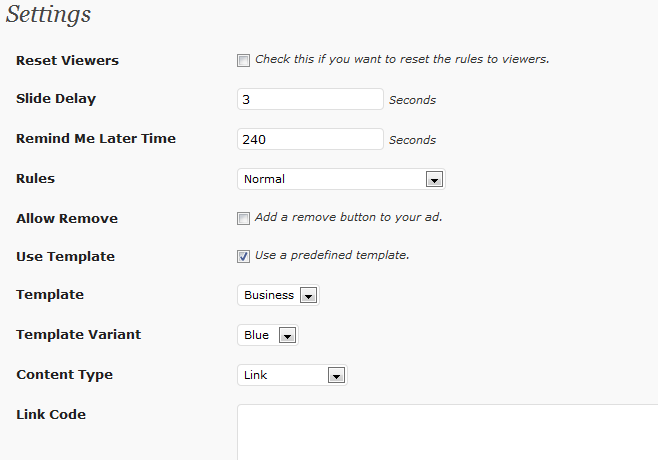
To that end, there are a number of rules that you can apply to an ad just by ticking boxes in most cases, and you’ll find these rules in the Ads Manager widget, waiting for you to set them:-
Display this ad unit only when the following conditions are met:
- The visitor comes from a search engine
- The post (not page) is more than 2 weeks old
- The visitor is not a regular reader (at most three visits in the past two weeks)
- The following php condition (WordPress conditional tags) is met:
In this last one you can add one of the WordPress conditional tags from this page:-
http://codex.wordpress.org/Conditional_Tags
So for example, you could add is_front_page() to the box and your vistors would only see the ad on the front page of your blog.
Or you could add is_single() and your visitors would only see the ad on a post and not on your front page, or you could use is_page() and the ad would only appear on pages, and so on.
Study the URL above for a deeper understanding of how conditional tags work. You’ll find it’s extremely powerful.
Redirection Plugin
The redirection plugin is extremely useful and allows you to redirect a page to anywhere you like.
We know that sounds like it might only be useful on very rare occasions, but consider this. You can use it for your affiliate links…
What you can do is create a dummy page on your blog that then redirects off to the site you want your visitor to go to, using your affiliate link. The link itself looks like a regular link to a page on your site, but when it’s clicked, your visitor is redirected.
Very cool for getting your visitor cookied without it looking like an affiliate link. 😉
When you create your page as you usually would, you’ll see there’s a new admin block underneath the editing area called PG-Redirection. If you leave it blank, then nothing happens, but if you fill in your URL, the redirection becomes active. You don’t even need to put anything in the main page editor, you can just leave it blank.
Tres cool huh?
Now I know you’ll want to take a look at the theme before you buy it! So we’ve set it up on the URL below together with some example pages and notes for you to read.
The header on this site isn’t the default, instead it’s one I uploaded using the built in browser / uploader. It’s a photograph I took a couple of years ago on a beautiful day in June, on the beach near the Black Rock Cafe at Widemouth Bay (pronounced widmuth) near Bude in Cornwall.
(I have such good memories of that day it’s actually my desktop photo…)
Use the menus when you get there to see an explanation of each of the main features.
http://broadexample.com/ (opens in a new window)
As I said above, I’m fairly certain I’ve missed some detail out, but it just won’t come to me right now. I’ll add a couple of videos when I get a few quiet moments. Your positive feedback and encouragement is always welcome.
This early bird sale for the third of the premium Multiple Streams Themes and TWO plugins is now on at just $10 for 48 hours or the first 50 people that buy the theme and plugins bundle. After this sale is closed, it will be $27.
You can get it now at the lowest price it will ever be by using the button below, and it’s strictly first come first served.
Update: The $10 offer is now closed, the theme can be purchased for $17 for a few days before we set the final price.


-Frank Haywood