Instant WP Videos

I was asked to do an overview video or two to show how Instant WP worked, and that’s what this is all about.

The first video is the overview, and the second is how to run it from a USB stick. Rather than use a “flash memory stick”, I used an external 2.5″ USB drive instead, but the principle is exactly the same.

I’ve actually had a bit of a cold and a sore throat, so I apologise if my voice sounds a bit gruff. And just to complicate things a little more, the video went out of synch with the audio for the second one so I had to remove my mug from it. “No great loss” I can imagine you thinking. 🙄

Instant WP Overview

Instant WP Running From a USB Stick

WP Simulator

If the free Instant WP isn’t enough for you and you’d like to run multiple WordPress installations at the same time, ie you need something with a little more oomph, then this is what you should be looking at instead.

http://www.frankhaywood.com/wordpress-sim-machine/

-Frank Haywood

Posted by Frank Haywood in internet business, software

Instant WP

There’s a new bit of *paid* software been released that allows you to easily set up a localhost WordPress installation.

You’ll likely get an email or two or three from people promoting it over the next few days.

I didn’t buy it because it’s already been done. For free. A few years ago.

(Probably more than once.)

Why would you want to install WP locally and not on a web site?

Simply because you get to test everything at lightning fast speeds BEFORE you deploy it on your web site. That way you can make sure everything works the way you expect it to before anyone else sees it live.

PHP is amazingly quick when run on an up to date PC. I can confidently say you’ve never seen WP run so fast until you run it on your PC – the page change on a menu click is near instant.

However…

The fact of the matter is setting up WP to run locally can be a nightmare, but some clever guy (Seamus Brady) in 2009 came up with the software to do it (for Windows only I’m afraid) and has been updating it every so often when it needs it.

It will even run on a USB stick for total portability (which I like). Just copy it to wherever you want to run it from.

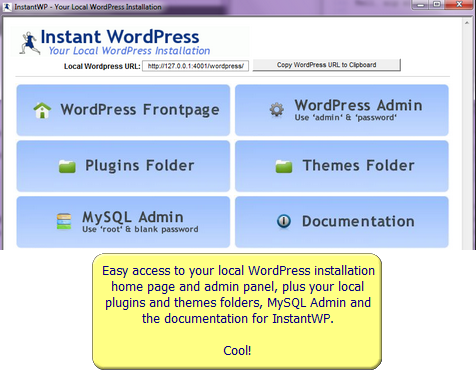
Once you’ve downloaded and run the executable unzipper, you just fire it up to get a really nice dashboard presented to you where you can see your local site, log into the admin panel, use MySQL admin, and view the documentation.

instant-wp-03

Trust me, it’s a doddle to use.

All the nasty stuff like setting up the Apache web server, PHP and MySQL are done totally transparently in the background for you and it just works, which is how we like things isn’t it?

http://www.instantwp.com/

There’s documentation on the site, but if you’d like me to do a few videos explaining it all and how to run it on a USB stick etc, then just let me know by leaving a comment.

My guess is there are similar freebies out there that I don’t know about, but if *you* do then please let me know and I’ll pass it on to everybody.  🙂

Now then, before I sign off, I know that some people will want to consider the paid-for option because there’s a whole lot MORE in the paid-for version rather than just the software – there are a number of bonuses too. No I’m not going to go through them all but it’s a quite a comprehensive list of information, themes, plugins, and how-to’s. (Take a look at the sales page on the link below.)

And one big technical difference between the free and the paid software is that the paid for version comes with 10 WP development installations you can switch between and the free version only comes with one.

So, free or paid?  You decide.

http://www.frankhaywood.com/wordpress-sim-machine/

-Frank Haywood

Posted by Frank Haywood in Check This Out, software, wordpress plugins, WordPress Themes

PLR WordPress Plugins

Of all the emails I get from people, questions about my WordPress PLR membership re-opening top the lot.

Well, it’s about to re-open on Sunday 28th April. Hurrah!

I know that there will be plenty of people reading this that will punch the air and shout “Yes!

My PLR membership has been responsible for a whole swathe of plugins being released. In fact I’ve released over 24 plugins with PLR, and I believe I was the first to be able to offer this kind of service as a membership.

Every so often I see them turning up in resale rights bundles, or being given away in return for people signing up to a mailing list, given away as bonuses, or tucked away in member areas.

People love these plugins. Even some of my own plugins I sell have made it into the PLR membership too.

And some members have even told me they only buy the plugins for their own use.

So what happened?

The membership had to go into a temporary closed state due to problems with PayPal (now resolved) and I hoped I’d have it re-opened by now, but other things have been going on and I didn’t have the time to do it as it does take quite a while to get everything ready.

But at last it’s time to kick it all off again.

And this time round I’ve decided to change the format a little with the re-opening.

For 2 years I supplied a plugin each month (sometimes late, ahem) with documentation and a sales page, and instructions on how to rebrand everything.

What I didn’t do was write any sales copy, and I did this for the very good reason that if you write your own sales pages, then you’re not competing with everyone else all selling the same thing.

All the smart marketers do this, me included.

YES! I love and buy PLR from time to time, spend a few hours working on it and release it all bright and shiny (and UNIQUE) as my own. If anyone has ever spotted that occasionally I’ve released a PLR product, then no-one in nearly 4 years of me doing this has ever said a word to me about it.

I put that down to the work I put into making enough change for it to be unique – there’s that word again. (And often I make the product better by adding value to it that wasn’t there.)

The trick is to move quickly and not overthink things.

Yes we all do that, me included, but I *try* to keep things as simple as I can.

With the old membership I didn’t write any sales copy and that was the one thing that I got criticised about most.

And so I resisted and insisted to everyone that brought it up that it was most important they do their own thing with the sales copy. But in the end I’ve realised that you have to give people what they want and it was dumb of me not to come to that conclusion in the first place.

I thought (and still think) I was doing the right thing, but okay…

Yes I WILL be supplying a sales page with the plugins in the new membership.

I figure that those people who want to write their own sales copy or heavily modify what I supply will do so, and those that don’t will just use what I give them, and that way everybody’s happy.

I’ll also be giving every plugin its own name and creating the documentation using that name. Again if you want to rename it and modify the docs you can do so, and everybody’s still happy.

So here’s the new membership deal.

Tomorrow and for 24 hours ONLY you can join for just $20/month. This will make a lot of people happy.

When that 24 hours is up, the price goes up by another $7 for another 48 hours and then AFTER THAT I’ll be changing the pricing structure of the membership for all new members. (Yes it will cost new members more money.)

Look, just don’t worry about it okay? Do not sweat it.

Join tomorrow when the membership re-opens and it’s all nice and simple (and cheap) for you. You’ll be a special founder member and won’t have to do what everyone else does afterwards. 😉

You can cancel your membership any time, but there won’t be any refunds because this is PLR.

Okay?

So what’s the first plugin at relaunch?

It’s the brand new and very cool “Time Sensitive Widgets” plugin.

This plugin puts a set of time in and out drop-downs on EVERY single widget and allows you to set a date and time for a widget to go active and inactive.

In other words you can set a date and time for ANY widget to show on your blog, and also set a date and time for it to disappear.

The possibilities of this plugin are MASSIVE. 🙂

Here are some examples plus that GREAT IDEA I mentioned at the beginning of this email.

You could use the Time Sensitive Widgets plugin to sell ad space, give away coupon codes, run daily video tutorials, do launch announcements and make EVENT NOTIFICATIONS. I know there are some people reading this that would be very interested in the posibilities of that last one.

In essence you could use the plugin to make your blog that extra little bit “stickier” and keep people coming back every day to see what’s happening.

>> For example, the video tutorials idea is a really sweet one. <<

It’s very cheap now to create quality desktop recordings. Where you once had to spend hundreds on expensive software, you can now pay something like $15/year to use a really cool tool to record and edit your desktop and webcam.

(Why don’t I do a video tutorial on that!?)

This is what you could do, and what I’m going to do too.

Create a series of short (less than 10 minutes each) desktop video recordings that show how to do something useful.

Show a new one in the series each day, and then remove it and replace it with the next one. You can set all these up in advance using the “Time Sensitive Widgets” plugin.

Your readers have to turn up every day in order to see the next one.

If they miss one that’s really too bad, but you could make an offer to them of joining your membership where they get new videos every month and get to see all of the other videos you’ve ever released, all tucked away for members eyes only.

You start with a low price each month and as the library grows in size and value you increase your price.

Is that a GOOD idea or what?

ANYONE could do this, why not you?  😉

It all starts with joining my PLR membership when it reopens on Sunday.

-Frank Haywood
Posted by Frank Haywood in internet business, software, wordpress plugins, WordPress Themes

New Theme XD07

Update: The sale at $17.00 for the scorchingly nice XD07 Theme and 3 Plugin Bundle is now LIVE.

You also get the very useful Scripts Manager and Snippet Inserter plugins as part of this deal.

Buy now

***

Here’s a link to a demo of the XD07 theme.

As you’d expect it’s really nice and has a number of great features to build a WordPress driven site around, such as:-

  • 6 built in colour schemes plus a custom colour changer.
  • A built in “Alert Box” popup optionally home page only or whole site.
  • Image and video slideshow with selectable slideshow transition effects.
  • 7 “Home Boxes” split into two sections, up to 4 boxes, and up to 3.
  • Optional social sharing icons for articles and post and pages.
  • Social networking Buttons at top and bottom (Facebook, Twitter, etc).
  • A “quote” area at the bottom, with WYSIWYG editor.
  • 4 editable footer widgets area.
  • A rich HTML WYSIWYG editor in many admin sections.
  • A custom CSS section so you don’t have to hack the stylesheets.
  • Featured posts category to display posts on the home page.
  • The ability to optionally turn on and off almost everything.

Plus some other bits and pieces such as add your logo or name text, phone number, and copyright notices, and the ability to disable the main nav bar if that’s something you’d like to do.

In other words lots and LOTS of options to play around with.

separator

In this launch sale it comes with a full developer licence (client/flipper) and I’m also including TWO BONUS plugins, Script Manager and Snippet Inserter.

The Script Manager plugin is exceptionally useful for adding things like tracking and popup scripts (javascript, PHP) to your site and I install it as a matter of course on all my blogs now.

You can either add your scripts globally (e.g. for tracking) or on a page by page or post basis – e.g. for popups and similar.

You can tell the plugin to insert the code in the <head> or <footer> areas of your site which is where most scripts are placed. Without the plugin you’d have to hack the theme to insert tracking code etc and you wouldn’t have any control over which page or post it would be active on.

Script Manager is a bit of a “must-have” workhorse of a plugin that just does the job efficiently.

separator

Snippet Inserter is a simple but very useful plugin that allows you to add PHP, javascript and HTML snippets to your posts and pages and supplies you with a [short-code-tag] to place where you want the code inserted.

For example you may want to add video embed code from YouTube to a particular page or post, or maybe some PHP, or a form. Normally WordPress doesn’t let you do this in the TinyMCE editor, but you can get round this problem with Snippet Inserter.

Both plugins come with full developer (client/flipper) licences in this deal.

The theme and two plugin bundle is just $17 for two days after the sale opens on Wednesday 17th at 2.00pm GMT/BST (9.00am EST/EDT), and will rise to $27 on Saturday morning, and then $37 at sale end on Monday.

My advice for what it’s worth is to get it as soon as the sale opens. 🙂

-Frank Haywood

Posted by Frank Haywood in internet business, WordPress Themes

Magic Styles Plugin

Update: The sale at $17.00 for the superb Magic Styles plugin is now live.

Buy now

***

On the 27th March at 6.00pm GMT (2.00pm EST/EDT) I’m launching a new plugin called Magic Styles that you WILL want to install on all your blogs.

I’m VERY pleased with it.

There’s no doubt in my mind that if you continue reading this post about Magic Styles, then you’ll want it.  It’s one of those universal “use everywhere” plugins. So if you don’t want to buy it then don’t read any further because there’s no going back once you’ve seen what it can do. 😉

Before someone points it out to me, yes it’s very similar in aspirations to Big Ed (if you have that other plugin of mine) and allows you to easily add a number of different boxes, buttons, bullets and notices to your blog posts and pages.

Where Magic Styles differs from Big Ed is that it’s a “lighter” touch on your blog (and editor), has a different set of abilities, and it’s very nice at what it does. (You can use both Magic Styles and Big Ed together if you wish.)

Yes it will do things that Big Ed can’t do (and vice-versa), and even nicer is that you can use them both together if you want to – it’s fair to say that Magic Styles is complementary to Big Ed.

Built in it has:-

  • 13 different button styles
  • 9 check marks to go on the buttons (optionally none)
  • Editable button text and a URL
  • 13 different fixed size testimonial boxes
  • Optional photo URL for testimonials
  • Left, right and none aligments for testimonial photos
  • 5 different “notice” box styles in pastel colours
  • 9 check marks to go inside the notice box (optionally none)
  • Left, right and center alignments for notice box text
  • 12 different check marks for bulleted lists

(The bullets above were enhanced with Magic Styles.)

It’s ideal for brightening up and making more interesting your regular posts and pages.

Here are examples of the different styles it can add to your posts and pages.

Buttons

There are 13 different button styles and they can be left, center or right aligned. There are 9 icons you can choose from to go onto the buttons, or optionally no icon. You can edit the button text on each one and choose a URL for the button click.

magic-styles-02


Click this for coolness!

27th March-6.00pm GMT

Buy it when live!


Testimonials

There are a selection of 13 different testimonial boxes. You can add photo images of the people who have given you testimonials and optionally left or right align them. Some of the boxes can be used as Johnson boxes.

magic-styles-01

Built in fixed size testimonial boxes with left or right alignment of images you add to the box. There are 13 different testimonial boxes in all, and some double up as regular johnson boxes.


Notices

There are 5 pastel shaded notices you can add together with a small icon.
These notices are really useful to highlight important sections of text.
They can be used for a wide variety of purposes.
Here’s another.
And one more. These are quite nice aren’t they?


Bullets

Finally, a selection of bullet points. There are 12 different check marks for the bullets – here they all are. Some of these are also used elsewhere in the plugin as you’ve probably gathered by now.

  • Alert.
  • Arrow.
  • Asterisk.
  • Bulb.
  • Cancel.
  • Check.
  • Clock.
  • Cross.
  • Lock.
  • New.
  • Plus.
  • Star.

I hope you agree this is a very cool plugin and one you’ll want to put in your arsenal.

The sale will go live on Wednesday 27th March at 6.00pm GMT (2.00pm EST/EDT) with the first 50 copies on sale at $10 – well worth it.

I fully expect these first 50 to go in the first hour or two, and then the price will rise and rise again as further copies are sold. The sooner you get here the lower the price – customers have told me they like this and like the excitement of getting the best deal so that’s what we’re going to do.

More news tomorrow together with a short video of it in action.

-Frank Haywood

Posted by Frank Haywood in internet business, software, wordpress plugins