Page Templates PTP101-PTP110

Update: The sale at $17.00 for the Page Template plugin plus 10 BRAND NEW page templates is now live. Included in this sale only is a client flipper licence.

Buy now

***

Today at 6.00pm GMT I’m releasing 10 brand new never-before-released page templates for the Page Template Plugin.

These are all very clean and attractive designs and come with the latest version of the Page Template Plugin (v1.0.5) which has had a minor bugfix.

(Start the video and then switch to 720p and full screen.)

If you’ve never heard of or seen the Page Template Plugin, then in a nutshell it’s a very elegant solution to adding pre-designed sales and squeeze pages to your WordPress driven sites.

Because it’s a plugin, then in 99% of cases it will work with your favourite theme and digital delivery solution.

This means you can build sites using a theme you like, plus a digital delivery or membership solution that you’re happy with, and set up independent sale and squeeze pages that don’t look like the theme.

In my view this is a better solution than using an all-in-one theme to create sales pages on your site.

Using the Plugin after Installation

Because these pages are all pre-designed for you, then you don’t even need any design skills.  😉

I’ve uploaded the templates and created some demo pages for you to see each of the templates here:-

http://60secondsalespages.com/ptp101/
http://60secondsalespages.com/ptp102/
http://60secondsalespages.com/ptp103/
http://60secondsalespages.com/ptp104/
http://60secondsalespages.com/ptp105/
http://60secondsalespages.com/ptp106/
http://60secondsalespages.com/ptp107/
http://60secondsalespages.com/ptp108/
http://60secondsalespages.com/ptp109/
http://60secondsalespages.com/ptp110/

Given that it can cost you an average price of around 47-67 dollars for a custom design that won’t even work with WordPress, I’m sure you can see this is a fantastic bargain and not one to be missed.  After the sale is over, each of these designs will be available for $5 apiece so if you want the best price, now is the time to get them.

Just $17. 🙂

-Frank Haywood

Posted by Frank Haywood in internet business, software, wordpress plugins

Mobile / Responsive – Some Thoughts

I’ve just answered an email asking about responsive themes, and I thought it would be a good idea to post my answer here too.  I was asked if any of my themes were responsive, and this is my reply.

separator

No they aren’t I’m afraid.  It’s a difficult thing to do and it’s often an unsatisfying result I find.

If you look at how YouTube have approached it recently, it’s ticked off a lot of people including my eldest son and his friends, who have had custom page templates designed in the past that were meant for a desktop based web browser rather than mobile.

What I’d like to see is a dual hit method where a theme presented the regular desktop appearance when viewed with a desktop browser, and something much simpler when viewed with a mobile device.  And there’s another problem, because what resolution do you define as mobile?  Cell phones – yes.  Tablets – hmm, maybe, oh okay yes then.  But what size tablet would you serve the mobile view?  My Kindle Fire HD is a 7 inch device but has a resolution of 1280×800.

Viewing “normal” web browser page is a little difficult because it’s only a 7 inch display, and a mobile view of sites would suit it better.  In contrast the monitor sitting next to me is a 19 inch device with a resolution only a little better than my Kindle at 1360×768, but viewing a mobile page on it would just be silly.  😉

And…  Cell phones will soon have (if they haven’t already) very high resolution displays but still tiny screens to show content.  What view do you serve them? Or do you just serve the same content to all devices and let the device sort it out?

That doesn’t work because of the resolution issue I discussed above.

*sigh*

I guess that eventually someone (it might be me) will come up with a clever (and simple!) solution, but it seems for now that we’re either stuck with normal desktop browser views, or responsive where everything moves around to occupy a different layout depending on the resolution of the device.  Neither is a very good answer.

It seems the only way to do it to make everyone happy is to have a number of different page views depending on device rather than on screen resolution.  You can sort of guess this by browser and OS, but sometimes it’s going to be wrong.

If you go to Starbucks.com on your desktop browser and then gradually narrow the browser you’ll see how the site adjusts, stacking images underneath each other.  That’s okay, but their site has had to be designed VERY simplistically and blockish for this to work.

Hands in air, right now I don’t know how to approach this but I guess at some point with some thought I’ll come up with something.

-Frank Haywood

Posted by Frank Haywood in internet business

Magic Optin Plugin

Update: The sale at $17.00 for the easy to use Magic Optin plugin is LIVE. The price will rise to $27 when the sale is over.

Buy now

***

Magic Optin Overview Video

In response to some questions about it, here’s a short 2-minute video on how to add the form code manually if it doesn’t get parsed correctly the first time round.

Many people will tell you that the size of your business is directly related to the size of your mailing list. While I know for a fact that’s not strictly true, more subscribers is always going to be better than less.

The Magic Optin plugin assists you in designing and placing optin boxes on your blogs, and gives you some pre-set designs you can mix and match and almost unlimited options for the colour schemes.

This means you can spend just a little time and come up with an optin design to suit your blog theme that will blend in really nicely and look like it was created by a professional designer and not you.  😉

Better still is that it’s VERY easy to use and includes a *custom widget* for your sidebar, AND a *short code* if you want to insert your new optin form into a post or page.

Here’s an idea.

Create your optin form, and then every time you add a new page or post to your blog, then add the optin short code so that your form appears within your content.

That way there’s a reminder on every single page and post for visitors to subscribe to your mailing list in order to find out when new posts are made and about any special offers (like a weekend sale) you may be running.

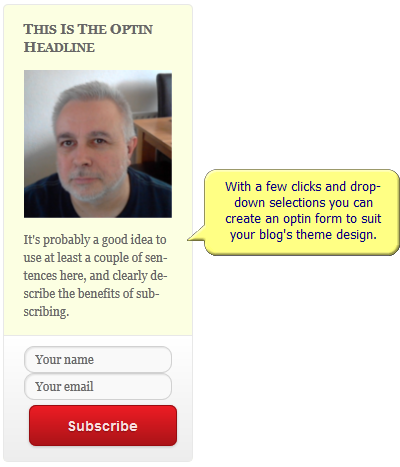
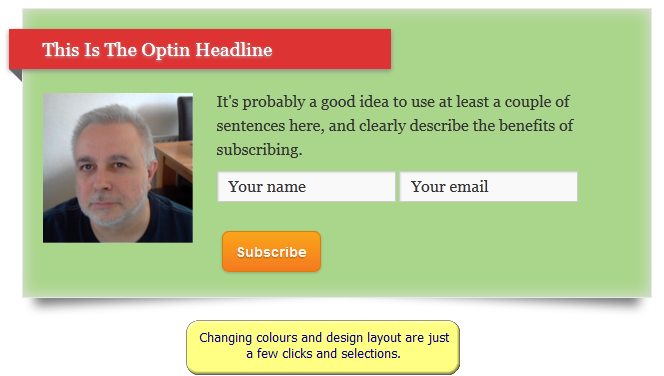
Here’s a few screen shots of the output of the plugin as an example.

The first shot is of an example of the optin form in the sidebar. The shots following that were generated using the short code tag and inserted into a post.  All styles were changed just by using colour pickers and drop-down selectors.

magic-optins-01

magic-optins-02

magic-optins-03


The sale price for this cool new plugin starts at $10 for the first 50 copies and then starts to rise. When the sale is over the full price of this plugin will be $27.

In this launch sale ONLY, also included are full developer (client/flipper) licences at no extra charge because I know that’s the way you like it. After the sale these will be an optional purchase.

These are good incentives to get the plugin today.  🙂

-Frank Haywood

Posted by Frank Haywood in software, wordpress plugins

Screen Sharing With Quick Screen Share

Here’s a 5 minute overview of a very useful, free, and really easy to use screen sharing tool.  I apologise if my voice is a bit gruff as I still have a sore throat.

-Frank Haywood

Posted by Frank Haywood in internet business, software

Magic Pages Plugin

Update: The sale for the dead useful Magic Pages plugin is live at just $12.50 until Saturday 18th May when it rises to $17 for one week before going to $27.

Buy now

***

Tomorrow Saturday 11th at 6.00pm GMT I’m releasing a new plugin called Magic Pages.

It allows you to very quickly create easy-format sales and opt-in pages with a choice of background colours and a few different page border styles.

SIMPLE stuff, but it’s really quite good.

It has a number of very cool little features, and addons:-

  • 5 box-outs in pastel colours with 2 border styles
  • 2 new list styles – drawn star and drawn arrow
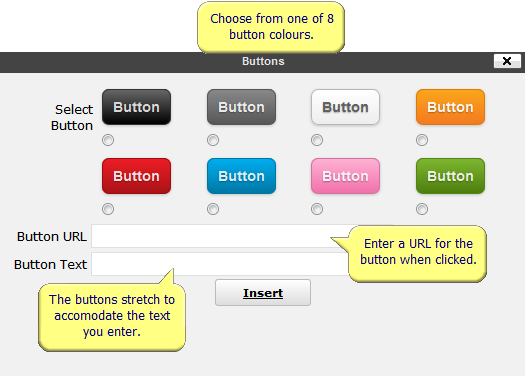
  • 8 different coloured clickable buttons
  • Buttons expand to accomodate the text
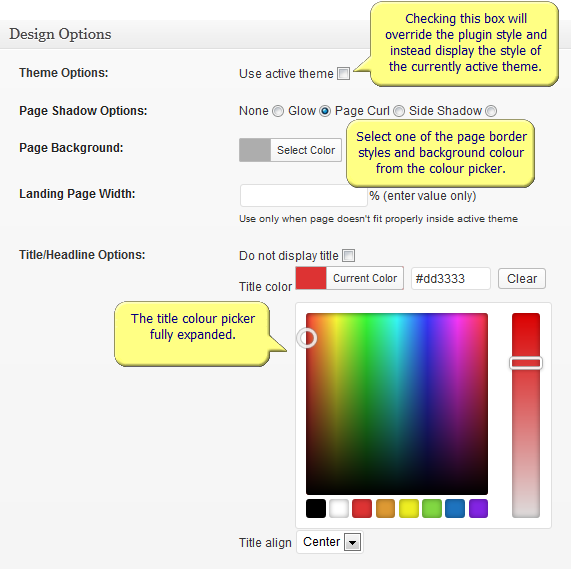
  • Page border shadow options
  • Page widths as a percentage (fluid!)
  • Colour pickers all over the place
  • Numerous text boxes
  • Auto-parsing of opt-in form code
  • And some other stuff


Here’s a screen shot of the box selector:-

magic-pages-02


And the button selector:-

magic-pages-01


***

A quick side note…

A few weeks ago I released a plugin called Magic Styles which was exactly as popular as I thought it would be.

That plugin gives you a number of useful additions to enhance your pages and posts such as graphical bullets and buttons, fixed size johnson boxes and pastel shaded notices.

You can still pick up a copy here if you missed it as there are a few remaining at $17.

http://www.frankhaywood.com/magic-styles-plugin/

***

But now it’s the turn of the Magic Pages plugin.

I had this plugin created for 2 reasons.

#1 – I’ve wanted something fairly quick and easy to use like this for my own personal needs for a while now – it HAD to be fast and easy. That was my #1 priority.

(And I also wanted to be able to use it with plugins like Magic Styles and Big Ed so that I could add nicely formatted text and box outs and bullets.)

#2 – I was genuinely surprised when I had some people say that 60SSP (based around the Page Template Plugin) was too complicated and was overkill for what they needed.

They wanted the same simple method of putting up a page that I’d secretly been wanting too.  😉

And so we have Magic Pages.

It allows you to create sales and opt-in pages without being too technical and lets you do things like choose a nice border style and background colour (picker) and optionally add a graphical headline banner.

magic-pages-04


The banner graphic was THE most asked about thing with 60SSP.

“How do I remove the headline and add a banner instead?” was a question I answered over and over.

I guess I shouldn’t have been as surprised as I was. I felt like I’d been caught on the hop and should have foreseen what people would want even though I wasn’t too bothered about it myself at the time.

With Magic Pages you can just insert your banner via the normal WordPress media library.

SORTED.  🙂

You can see a couple of example pages here and here.

The sale kicks off tomorrow Saturday 10th May at 6.00pm GMT (1.00pm EST) with the first 25 copies going at $10.

More news when it happens.

-Frank Haywood

P.S. I’m hoping that the Amazon S3 Video plugin will be ready very shortly for those that are waiting. I’m sorry about the delay.

Posted by Frank Haywood in internet business, wordpress plugins