The Power Of Price Comparisons

Two weeks ago, my wife put up a niche web site showing a number of comparative products within that niche.

She used the automated Vendiva Price Comparison Service to show regularly updated prices for a number of different merchants, and she also put links to Amazon and highlighted that they offer free delivery too. It’s a fact that in most cases Amazon offer the lowest price and in any case anything over £5.00 is now free delivery.

She spent at most 3 part-time days working on the site, probably about 15-18 hours in total – “if that” she’s just said to me.

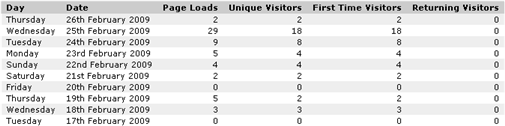
Last night we sat down to check traffic to our sites and saw that the site she built 2 weeks ago had received a jump in traffic and received 18 unique visitors yesterday. More importantly, 2 of them had used links that took them to Amazon.

She checked Amazon this morning and saw that one of those visitors had ordered the item that they had searched for and found on her site, earning her approximately £13.12 ($18.70). She won’t know the exact amount until Amazon dispatch it and it turns into earnings in her affiliate panel.

I think that’s probably a lot more than most people earn with AdSense every month…

The wonderful thing about all this is that other than add more products to the site – which she’ll do when she finds a few moments each day (and which will generate even more traffic) – she won’t have to do anything with the existing products that are on there. People will continue to find the site using the same search terms they’ve done over the last few days.

As traffic to the site increases, so will her earnings. All passively. All done on autopilot.

We put the conversion solely down to the fact that she shows a range of prices and merchants for each product she’s promoting.

All prices are clickable and take the visitors through to the merchant site using her cloaked affiliate link.

All prices are auto-updated several times a day using direct feeds from the affiliate networks.

This is a dynamite method of instantly gaining your visitors trust. And more importantly from your point of view, their gratitude.

After all, you’ve just saved them a lot of searching around for the best price available, and if they click the links through to the merchants sites they can see for themselves that the prices are accurate and up to date.

Getting the traffic is easy enough, getting people to click your affiliate links is harder.

You can make it much easier using the same methods as my wife does.

Here’s a picture of the gradual increase in traffic over the last few days. My wife has done nothing to promote the site other than create it and give it a backlink from two other sites to get it indexed naturally which we think helps. (Ignore todays traffic of 2 visitors as it was still quite early when I took that snapshot.)
sue-site-traffic.png

You can do exactly the same thing as she is. What are you waiting for?

-Frank Haywood

Posted by Frank Haywood in internet business

The Importance Of Testing And Tracking

Do you test and track?

Logically you may know you need to, but you may be a bit like I used to be where testing and tracking was the absolute last thing on my mind. I put it to you that if you don’t test and track then you don’t really have any basis on which to make decisions.

I’ll give you some examples.

#1 – If I didn’t know how many visitors I get to this blog, I would have given up a long time ago.
#2 – If I didn’t know what keywords people were finding my various sites with, I wouldn’t know what to change the words to, so that I could increase the amount of traffic to those sites.
#3 – If I didn’t try different things and then look at the resulting data a few weeks afterwards, I wouldn’t know if what I was doing was right or wrong.

More recently if you’re a regular reader, you’ll know I’ve been putting up sites to promote and sell physical goods on Amazon and the like.

Every single site gets tracked completely.

  • When I get a visitor, I know how they found the site.
  • I know what keywords they used and I know what search engine they came from, or even if they’ve bookmarked the site and are returning via that bookmark.
  • I know what pages they looked at while they were visiting and the path they took.
  • I know what link they clicked on to leave the site, or if they left by closing their browser.
  • I know overall how my sites are growing (or not) and as a result I can see if I picked a good product and keywords to promote, and I know if I should give the site any more attention.

I wouldn’t know any of that if I didn’t track all the traffic on my sites.

My question to you is…

Do you test and track?

-Frank Haywood

Posted by Frank Haywood in internet business

Choosing Keywords and Good Domain Names for IPK Sites

I’ve come up with a preliminary method of deciding which keywords and domains to register for IPK sites.

Simply it’s the number of exact match search multiplied by the number of phrse match search, and then dividing it by the number of competing pages in Google to come up with a number you can use to make your decision. I’ve called this the x-factor as I’m feeling a bit unimaginative at the moment.

(exact match x phrase match) / competing pages = x-factor

It seems that if the x-factor is more than about 50, then it’s a good choice. This method isn’t perfect and could do with a little work, but it seems good enough to make most decisions on until I can come up with something better.

I’ve posted a good few examples on the Unoffical IPK Forum and gone into more detail too. Here’s a selection of them:-

#1 – ( 3,600 x 9,900) / 18,000,000 = 1.98
#2 – ( 2,900 x 14,800) / 201,000 = 213.53
#3 – (22,200 x 110,000) / 399,000 = 6120.30
#4 – (33,100 x 33,100) / 101,000,000 = 10.85

I’m very interested in what you think about this, so please go check out the forum post and either leave a comment there or here.

http://www.vendiva.com/forum/index.php/topic,249.0.html

-Frank Haywood

Posted by Frank Haywood in internet business

A Different WordPress Theme – Mandigo

I’ve been thinking of changing the theme on this blog. Yes we all need a bit of a change now and then don’t we?

One of the themes I’ve been looking at is the Mandigo theme which is a free one. I’ve been playing with it on a couple of IPK mother sites I’ve set up, and it’s really very nice, better than some of the paid for themes I’ve purchased.

I can confirm it works perfectly with WP 2.7.

(Speaking of which I am really beginning to dislike WP 2.7 because of the dopey new admin interface – WHAT were they thinking? I hope good sense will get them to change it back to the interface we know and love. Anyway…)

The Mandigo theme has a LOT of configuration options so you can make it look quite different on each site you build with it. And of course it works with WP widgets.

For instance it runs at 800 pixels wide, and you can change it to 1024 at the tick of a box in the admin panel. It has several different colour schemes built in (including header graphics) and you can amend them all from within the theme options – no fiddling with the standard WP theme editor.

In fact there are a LOT of options you can change, and the author has even added “HTML inserts” which allow you to change and add useful things such as CSS amendments or tracking code without you having to amend the theme files themselves. The benefit of that is when you upgrade to the latest version, you won’t break any of the changes you’ve made to your site. Very cool.

The default layout shows two columns, the main area and a right hand sidebar. But you can enable a second sidebar, plus top and bottom “sidebars” too which are useful for dropping sign up code or ads into. You can place the left and right sidebars in any configuration you like – sb1-main-sb2, sb2-main-sb1, main-sb1-sb2, etc and you can change the widths of them individually too.

Any pages you add automatically appear in the top menu, and if you create sub-pages in the WP admin area, they appear as sub-pages in a drop-down menu.

You can easily change the appearance of the date in posts, or even remove it altogether.

There are a LOT of settings you can tweak, and I found it possible to make all the changes I needed to make it ideal for use with IPK mother sites. It even has SEO options to re-write title tags, although I use the All-in-One SEO Pack for that purpose.

In Mandigo, it is very easy to change the header graphic. All you have to do is create one and FTP it into the headers directory within the theme at:-

/public_html/wp-content/themes/mandigo/images/headers/

then change a setting within the theme options and your custom header will be displayed. If you drop several graphics in there, they will be displayed randomly. You can even have a different header show per page if you want to by twiddling with a few files.

It really is an excellent piece of work, and I suggest it’s worth taking a little time out to check it out. I’m sure you’ll be as impressed as I am.

-Frank Haywood

Posted by Frank Haywood in internet business

How To Find Hot Niches With Dead Simple Market Research

Going on from my last post about market research, I’ve finally finished editing the video that shows you how you can find hot niches using a few minutes of your time and free tools from Google.

Google released a new search tool a little while back that pretty much tells you which niches people are searching for products to buy. It’s supposed to be used to assist AdWords users uncover keywords to match pages on their web sites, but you can also use it in reverse.

They don’t make it very obvious how to do that though and hide the link at the bottom of the page. 😉

The thing is, when you start using it you can quickly work your way down to a relatively quiet and valuable sub-niche with a little thought.

I say it in the video, and I’ll say it here too – it’s a gold mine!

This data is coming from the biggest database in the world, all pre-processed and packaged up for you. And Google are giving it to you for free.

No other market research tool can compete with Google – they know for a fact what products people are searching for – and they’re telling you where the hot markets are.

What I’ve done is uploaded a 15 minute video on how to do niche market research, and then I’ve put a much longer post about it which is a transcript of the video on the Warrior Forum.

You can read the post and the transcript, and get a link to the video and a downloadable PDF here:-

How To Find Hot Niches With Dead Simple Market Research

I hope you enjoy this, and if I get enough positive feedback about it on the Warrior Forum, I’ll do more.

If you like it and you’re a Warrior Forum member, then please say so on the forum. If you’re not a Warrior Forum member, then you should be – go sign up.

-Frank Haywood

Posted by Frank Haywood in internet business