PRE-ORDER Sale – Affiliate Click Pal

Offer Closed

As a thank you for being a subscriber, I’m releasing 50 PRE-ORDER slots for my new unified affiliate script – Affiliate Click Pal – at just $10 each this weekend.

Let’s run through a quick list of the features and benefits.

o Saves you a pile of cash by using only ONE ClickBank vendor account (1x$50) for all your sales pages on all your sites
o Up to 500 landing pages per vendor account instead of one
o Handles multiple vendor accounts not just one
o Can handle thousands of saleable items and affiliates
o Generates globally unique (GUID) affiliate links
o Generates secure order links (GUID) for your sales pages
o Digital delivery – sends customers to the download page
o Customisable affiliate variable – no more “affid”
o Affiliate groups – only some groups can promote special items
o Variable commissions via different vendor accounts for same saleable items
o Pass parameters to third party scripts via short code tags – [affpaypal] [affemail] [afffirstname] [afflastname]
o Customers automatically get added as affiliates
o Default page by vendor account for affiliates who use CB hoplink instead of their unique URL
o Support for third party scripts that use the ?e=PayPalEmailAddress method
o Looks really cool… 🙄

These features (and some others) are all included in the first release version of Affiliate Click Pal, and there’s a big pile of other stuff waiting to be added.

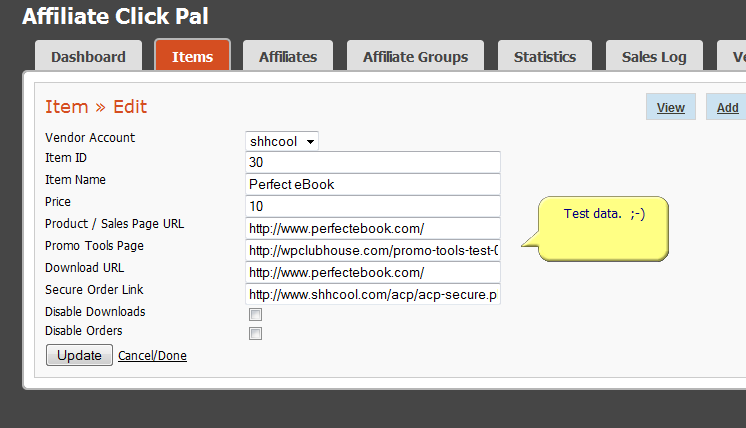
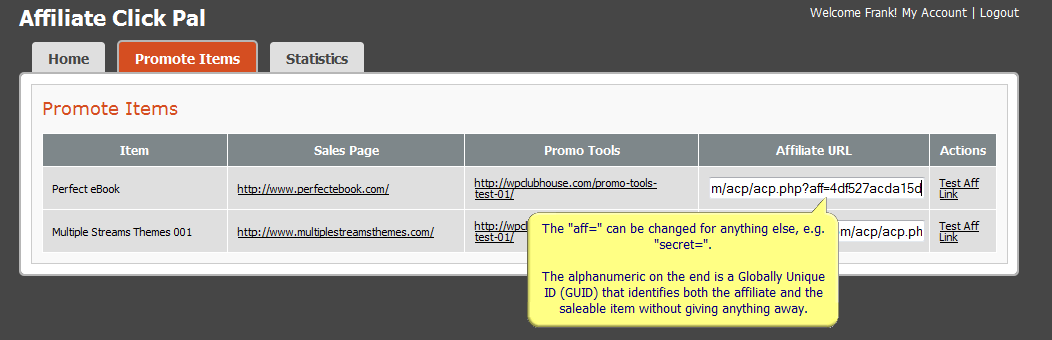
How about a few screenshots? You can middle-mouse-click the images to open them up full size in a new browser tab.

Admin Panel #1

Admin Panel #2

Affiliate Panel #1

Anyone that buys Affiliate Click Pal in this pre-order sale will get all the upgrades we have planned up to v2, and we have a LOT of stuff in the pipeline. 😉

Eventually this script will be one of my flagship products and will likely cost a whole lot more than you see here.

This is your chance to get Affiliate Click Pal at the lowest price it will ever be.

The PRE-ORDER sale starts tomorrow at 6.00pm BST (British Summer Time or GMT+1), which is pretty much the same as 1.00pm EST.

Be there or be square.

And please leave a comment after the tone. 😉 We’re all interested…

-Frank Haywood

P.S. After several people have asked me about this, I’ve TEMPORARILY re-opened the nickel sale for Corner Peel Ads. Another day and that’s it.

Posted by Frank Haywood in internet business, software

3 For 1 Weekend Sale

This weekend for 72 hours starting at 6.00pm GMT, I’m doing a final sale of 3 complementary WordPress plugins before placing them on their individual sales pages and adding them to the affiliate scheme.

(I *have* already pre-released all 3 to a small number of people and so you may already have them. This is a final sale for those people who don’t…)

I call them my “control” plugins and I use all 3 of them on most if not all of my blogs. Combined together, they move WordPress closer towards being a full blown CMS. I believe they should actually be part of WordPress and not just plugins, but there you go. One day maybe.

#1 – Ads Manager

The first of these three control plugins is “Ads Manager” and is incredibly powerful. It allows you to display ads and other text and HTML in widgets depending on lots of different rules you can set.

Here are some of the features and the kind of thing you can do, it’s not an exhaustive list.

o Stop an individual ad from showing to your regular visitors who would probably already have “ad blindness”.
o Only show a particular ad to visitors who have come from search engines.
o Only show the ad on posts that are more than 2 weeks old.
o Use WordPress Conditional Tags such as is_front_page() so your visitors only see the ad on the front page of your blog.
o Use is_single() and your visitors would only see the ad on a post and not on your front page.
o Use is_page() and the ad would only appear on pages, and so on.
o Specify individual posts and pages, or put another way, it enables you to show different ads on different posts and pages.

It’s very cool and is one of my favourites.

#2 – Widgets In It

This plugin allows you to place ANY WIDGET in any POST or PAGE, not just in the sidebars.

When you activate the plugin, it creates a new sidebar on the widgets page. You can then drop any widgets you want into it as normal.

Then when you create or edit a post or page, there’s a new drop down appears on the edit page which contains all the widgets you placed in the sidebar.

This means you now have ultimate flexibility and control over your ads by using these two plugins in combination.

Simply…

o Ads Manager lets you set rules for displaying ads.
o Widgets In It allows you to place widgets (including ads) inside your posts and pages.

There’s a video that shows you how Widgets In It works on this page here:-

http://www.multiplestreamsthemes.com/multiple-streams-themes-videos/

#3 – Contextual Widgets

This final control plugin “Contextual Widgets” allows you to decide which widgets will appear on which parts of your site. It works with ALL standard widgets, not just the ones I’ve released.

Now I know you might still be wondering a bit at the moment, but I’ll try to explain.

You know how a WordPress theme allows you to drag and drop widgets into the sidebars? Well it’s usually a case of all or nothing. Once you’ve dropped them there, all you have is the same widgets in the sidebar on *every* page and post on your site.

There’s no way of saying you don’t want to see a particular widget on a certain page.

Until now.

With “Contextual Widgets” you can choose exactly in which context each widget will appear.

So you may decide that you only want to place a particular ad in a sidebar on a particular page (context).

Example #1

You write a blog page that discusses the importance of building a mailing list (the why), but you don’t put in any details about the steps they need to do it (the how). Over in your sidebar are your affiliate ads for an ebook on list building and an autoresponder service that only shows on that page, i.e. in that particular context.

Example #2

A visitor arrives at your site via a search engine and lands on one of your tag or category archive pages. They see an ad that’s nowhere else on your site.

Example #3

A visitor to your home page sees links to some of your best articles in the top of the main sidebar. They click on one of the links and end up on the page they’re interested in, with a strongly related ad to the article, while your list of articles has been moved further down the sidebar.

***

Aha! Get it?

There are plenty of contexts built right in:-

o Home – Your site’s blog page if it isn’t set to your front page.
o Front Page – Your site’s front page which can be different to your blog.
o Post – Individual posts, ie not your home/blog page.
o Attachment – For your attachment pages, e.g. movies, audio and images.
o Author – Author archive pages.
o Category – Category archive pages.
o Date – Date archive pages.
o Tag – Tag pages.
o Search – Search results pages.
o Page not found – Your 404 error pages.

Plus every single page you create gets auto-added to the list of contexts. So every page you write about any topic can be set to show its own unique ads.

I hope by now you can see how powerful this third plugin is, and how it gives you an extra level of control over your blog that a standard WordPress installation doesn’t. 😉

***

Starting tonight at 6.00pm and until Monday morning you can get all three plugins for just $17, then that’s it. The chance are the next time you see these for sale will be individually at $27 each, so this is your final chance to get them if you don’t already have them.

At 6.00pm tonight this post will be updated and the payment link will automatically appear. On Monday at 9.00am, the payment button will disappear (powered by the Content Replacement plugin).

-Frank Haywood

Posted by Frank Haywood in internet business, software, wordpress plugins

Affiliate Scheme Madness and Beta Testers

I know I’m a little crazy sometimes and I do change my mind about things, and if you’ve noticed this about me, this next bit should come as no surprise.

Right after getting the unified affiliate scheme all installed, configured and ready to announce to the world…

I decided I didn’t like it.

I’d used a third party script which is quite good (and certainly does what it says on the tin and I know is used by some marketers I’ve purchased from), but me being me, I started to spot holes in it and areas for improvement. And some other bits which I thought were pointless or could be done in a different way as to make more sense.

So… Dum-de-dum-de-dum…

I made a list of improvements, created a first rough outline of what I wanted and asked one of my developers to go do some work on it. Since then it’s gotten a bit big and feature rich and still isn’t finished yet. It’s not a plugin, it’s a standalone script, but we’ll be making sure it will talk to any related plugins such as Affiliate LINK Pal and the Promo Tools plugin.

In fact I’ve now realised that it will eventually become my flagship product and possibly replace SmartDD at some point. There’s no PayPal support in there at the moment – just ClickBank – but PayPal could be added later.

This new product is going to be called Affiliate CLICK Pal (ACP), and while I’ve already taken out the domain, there’s nothing there yet.

The script itself does something which I think is quite clever with CB accounts.

As a CB vendor yourself, you’ll know that CB only allow one landing page per CB vendor account, which I’ve always thought really sucks.

Especially as they now let you have up to 500 products in your vendor account.

It seems they want to make a bit of money selling you new vendor accounts ($50 first one, $30 additional accounts) for every single site you create. And that they expect you to run each site you want multiple products on with that single landing page I mentioned.

So under normal circumstances, an affiliate may want to promote a product on one of your multi-product sites, but all they can do is direct traffic to your main landing page. And if the prospect then buys something on another of your sites, the affiliate gets nothing as it’s done through another CB vendor account.

As you can imagine, this is quite unattractive to affiliates.

What ACP will do is allow you to run ALL your sites through a single CB account saving you a pile of cash on multiple CB vendor accounts, and enabling your affiliates to get links for any of them that will direct their traffic to the correct landing page. If a prospect then later buys one of your other products on another site, they earn commission for that too.

Doing it that way makes it VERY attractive to affiliates.

And what we’re also hoping to do as a side-bonus is, if you already have multiple CB accounts (and we’re able do this), you’ll be able to merge them all into a single affiliate scheme. In theory it should work, but in the real world it may be impractical. We’ll see.

What I’ll need soon is a couple of beta testers as this will be quite a big product and I don’t think I can test it totally in-house.

Are you interested?

You will need to have a ClickBank vendor account in use on a live site and be willing to use ACP on your live site to manage affiliate link generation.

You’ll also need to set up at least one other site to test out the redirection and some other things.

The reward is a free copy of the script, plus some other bonuses. 😉

If you think you have time to test this out and you have at least one sales site and CB vendor account, and you want to give it a whirl to look for bugs and try to break it, just leave a comment below.

-Frank Haywood

Posted by Frank Haywood in internet business, software

New Multiple Streams Theme – MST008

Update 6th July 2011:

The videos for this theme have *finally* been completed and you can see them here:-

http://multiplestreamsthemes.com/videos/mst008-videos/

Update 22nd June 2011:

MST008 has been updated to v 1.0.1 due to an easy to fix but annoying bug…

Some people may have been having a “headers already sent” problem with this theme. We didn’t see this on our test bed, so maybe the server(s) we’re using are more forgiving than others. It happens when some spaces or blank lines get inserted into a PHP file where they shouldn’t be.

Happily, WordPress know about this issue, and there’s an explanation of it here if you ever come across it yourself.

Just go back to your personal download page and grab the latest version, we’re sorry about any inconvenience.

Update: I’m sorry for the delay, the theme and plugin bundle is now available. There were a number of small issues I had with the theme, now all resolved. Please go back to your personal download page and you can grab it from there. 🙂

Offer Closed

***


The latest in the Multiple Streams Themes (MST008) is now *almost* complete, and on Friday 26th May at 6.00pm GMT (1.00pm EST) I’ll be running a 48-hour 50-copies-only PRE-ORDER sale at $10.00.

It comes with a nice selection of pre-designed banners including blank JPEGs and PSDs for them, plus umpteen sidebars, a selection of built in page templates, plus plugins (Ads Manager, Redirection, Squeeze Page Templates), and a set of theme options too.

The theme options allow you to turn on and off the header, top boxes and top and bottom ad areas, change footer text and add analytics code if you don’t have the Script Manager plugin.

And of course the theme supports the common WP 3.x features of custom menus, and background. That second one allows you to further lighten the feel of the theme or darken it down if that’s your preference.

And… after several requests we’ve added an extra “ad sidebar” at the top, so instead of the usual 3 ad blocks for sign ups, freebies, etc, there are now FOUR.

And finally, we’ve included a slider area at the top under the menu where you can place presentational images, extra ads etc.

It’s really nice, very businessey, probably the most professional looking theme so far… 😉

More on this tomorrow, but just in case you’re thinking “Hang on! I’ve bought all of them – what happened to MST007?” Well, someone else is working on that one, so they’ve got a bit out of order. When it’s done I’ll release it don’t worry. 😉

For now, MST008 isn’t quite ready as I’ve asked for a couple of under-the-hood changes and I’m expecting to get it in the next few days.

You can get a sneak preview of the theme here:-

http://mst008.multiplestreamsthemes.com/

The pre-order sale starts tomorrow at 6.00pm BST (British Summer Time, which is GMT+1).

-Frank Haywood

Posted by Frank Haywood in internet business, software, wordpress plugins, WordPress Themes

Promo Tools Plugin 48 Hour Special

Offer Closed

***

Today (Saturday) at 6.00pm GMT I’ll be running a 48 hour special for a great new plugin called the Promo Tools plugin.

I know it’s unusual for me to run a pre-launch sale like this at the weekend, but I won’t be around until Friday afternoon (possibly evening), as I have a scheduled hospital visit.

(The same goes for the affiliate scheme – I’ll have some news for you about that too.)

I then want to release the plugin officially and immediately when the sale is over.

As part of the scheme, I’ll be using the new Promo Tools plugin – it seems to be perfect for our needs.

In case you don’t know what a promo tools page is, it’s usually a page dedicated to supplying an affiliate with a set of promotional tools together with their affiliate link embedded in them.

And that’s exactly what the Promo Tools plugin can help you with.

It will allow you to create pages that you can fill with promo tools you create for your affiliates such as pre-written blog posts, articles, emails, forum signatures and banners.

With this plugin, once you’ve set up the tools, all an affiliate has to do is paste their aff link into the box at the top and every single promo tool on the page gets auto-populated with their affiliate link.

Then they can copy the code for banners etc and paste it directly into their web site.

It makes the whole process a lot easier for affiliates, and the easier you can make it, the more attractive it becomes.

And while I know this is contrary to the 80:20 rule I live by, experience tells me it’s the many little things like this that make the BIG difference.

Many apologies for these changes, I know it will all be worth the wait.

-Frank Haywood

Posted by Frank Haywood in internet business, software, wordpress plugins