PopScroll Plugin

Update: The sale for the nice and useful PopScroll plugin is now live at just $10.00 for the first 36 hours.

It will then rise to $12.50 for the duration of the sale.

Buy now

***

In this sale only it includes full developer (client/flipper) licences, plus a RESALE RIGHTS licence. This additional licencing will be removed when the sale is over and will be an optional purchase.

DEMO PAGE HERE

Call Attention To Memberships, Reviews, Affiliate Schemes, Whatever You Want…

The story behind this plugin is I wanted something that would easily allow me to add a simple alert when a visitor scrolled down the page, and that would point them in the direction of the affiliate program for a site I’m working on. And I wanted it to work on only certain pages.

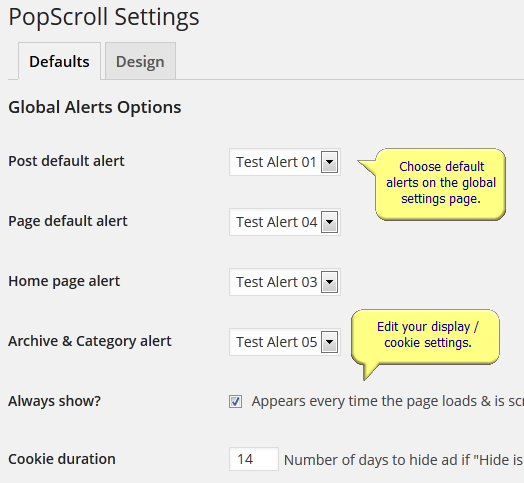
popscroll-01


The plugin that now does that has actually ended up being a lot bigger than my first simple requirement.  😉

You can now:-

  • Create as many alerts as you want
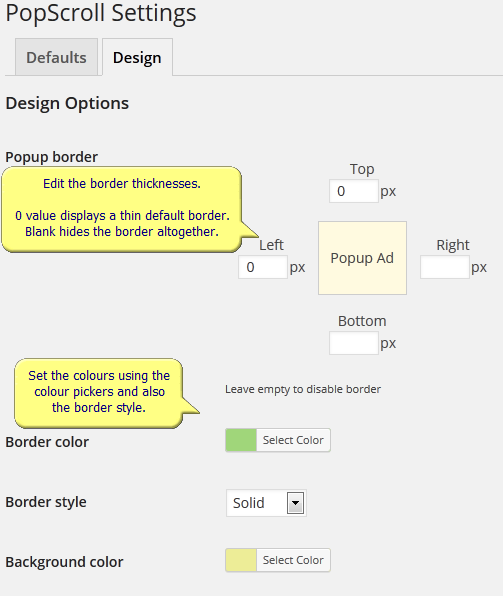
  • Set border styles and colours
  • Set background styles and colours
  • Include images (calls to action)
  • Set alerts to trigger globally
  • Set alerts to trigger on posts
  • Set alerts to trigger on pages
  • Set alerts to trigger on special pages
  • Set individual alerts for posts and page
  • Disable alerts for individual posts and pages


popscroll-02

It’s now tremendously useful – far more than I needed – and I’m very pleased with it.

You can also get as much fun out of it as I am in this sale today.

For example you can use it to highlight a new daily offer, or direct people to another site, or a product review, or a payment link, or…

Whatever.  😉

As I said, in my case I wanted to highlight the affiliate scheme for a site, but of course the PopScroll plugin will do a whole lot more than that.

The sale starts today Friday 7th at 6.00pm GMT (1.00pm EST) at just $10 including the additional licencing for the first 36 hours. The price will then go up.

-Frank Haywood

Posted by Frank Haywood in internet business

Comment Ads Plugin

Update: The sale for the compelling Comment Ads plugin is now live at just $10.00 for the first 48 hours.

It will then rise to $12.50 for the duration of the sale.

Buy now

***

Build Your Mailing List Or Show Them An Ad – It’s Your Choice

This plugin takes advantage of the moments following when a visitor has left a comment on your WordPress driven site, to present them with an ad or other call to action such as opting in to your mailing list. After you’ve set colours etc, it might look like this:-

comment-ads-05

This is a prime time to show your visitors something like this as they’ve just committed a few minutes of their time to leave a few words. While they’re still focussed on you and your site then the chances are high that they’ll spend the next few moments checking out your offer.

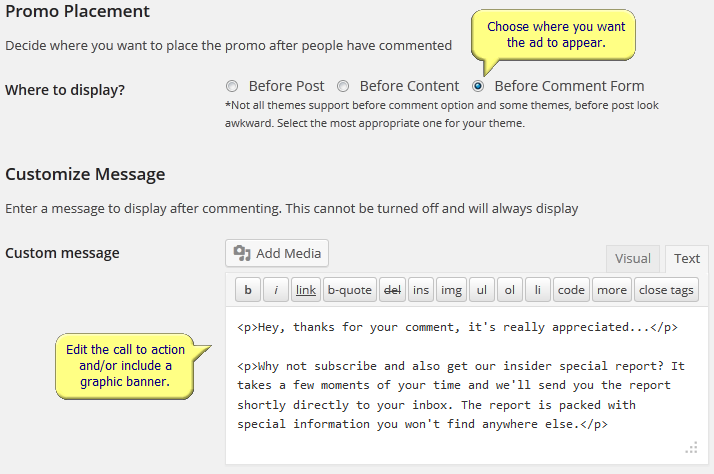
The plugin admin settings allow you to design elements of the ad, including: content, size, border and background colours, optin forms etc in an easy to use panel.

Set ad placement and content.

comment-ads-01


Set social options.

comment-ads-02


Add your autoresponder form code.

comment-ads-03


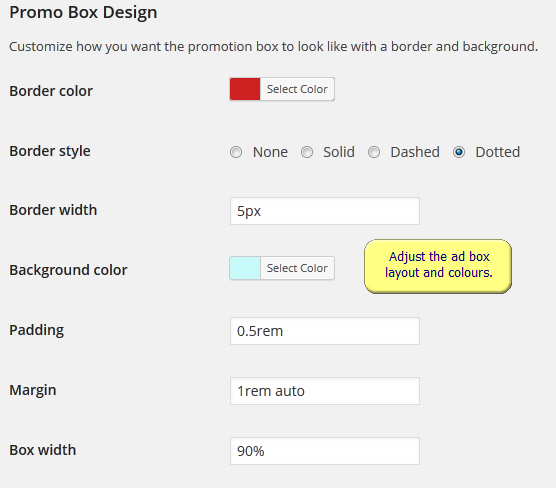
Finally, adjust the ad box layout and colours and then save your settings.

comment-ads-04


You can see what the comment ad in this example looks like for yourself here on this demo site. Just leave a comment on either a post or page and you’ll see the call to action ad appear.

Together with some design and layout changes I’m making to my key sites, this plugin will become part of those sites and also my overall strategy.

You could do the same thing.  😉


-Frank Haywood

Posted by Frank Haywood in internet business

Secret Backdoor Plugin

Update: The sale for the save-your-bacon Secret Backdoor plugin is now live at just $10.00 for the first 36 hours.

It will then rise to $12.50 for the duration of the sale.

Buy now

***

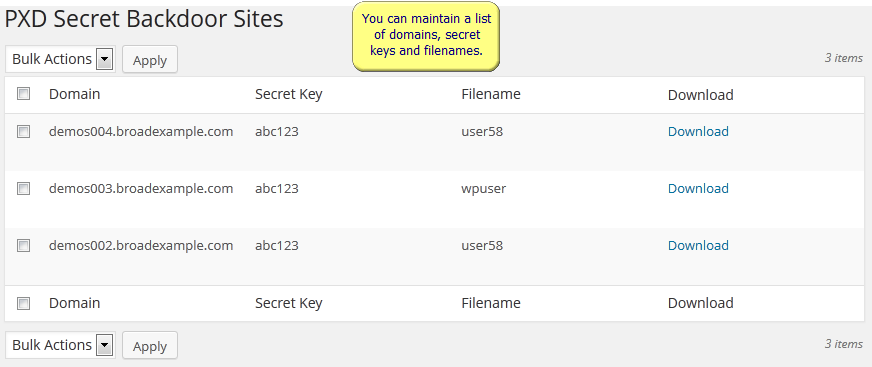
The back door plugin has been designed to manage and generate small scripts you can download and then upload to all your sites and all your client sites too.

pxd-secret-backdoor-01

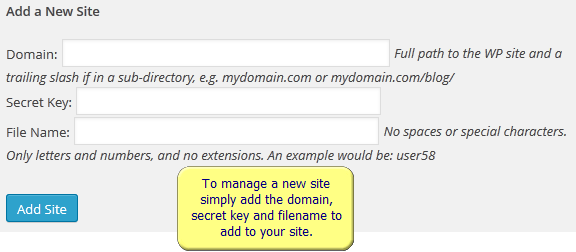
These small scripts enable you to create a WP admin account on sites where you may have had your access removed for one reason or another such as a hack attack. If it’s a hack, you could either leave the script there the whole time, or upload it by FTP after the “event” and then call it from your browser to re-enable access to the WP admin panel.

pxd-secret-backdoor-02

As another example, if you have a non-paying client that has removed access to the site you’ve been working on, you can use it to regain access by creating a new admin account and then remove the work you’ve done until the client pays you.

I’m sure this situation has happened to many web developers and consultants.

In this case you would have to place the script on the site as a precautionary measure beforehand.

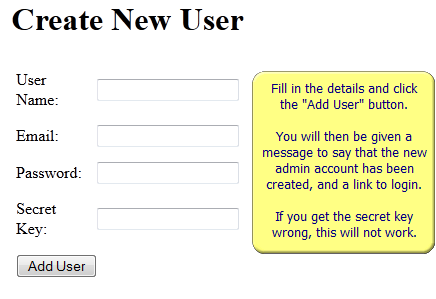
Once you need to regain access to the site, you simply call the script in your web browser and you’ll see a simple form where you add your new username and email address plus the password you want to use for the new account, and also (most importantly) the secret key.  Without the secret key you won’t be able to create the new account – you should make sure that the secret key is something that’s isn’t easily guessable.

pxd-secret-backdoor-04

Finally, it could also be used to temporarily create an admin account where a customer has asked you to look at their WordPress site but has only given you the FTP login details.

It happens, believe me!  😉

Because this plugin is a joint venture between Glen and I, it won’t be available in the Plugin Great members area, sorry.

If you’re a PG member, don’t worry I’ve got some other cool plugins in the final stages.  🙄

I’m sure once you see how it can save your bacon that you’ll want to add it to your arsenal.

Frank Haywood

Posted by Frank Haywood in internet business

Dynamic Download Plugin

Update: The sale for the very useful Dynamic Download plugin is now live at just $10.00 for the first 36 hours.

It will then rise to $12.50 for the duration of the sale.

Buy now

***

Turn Your Links Into List Building Ads

You can find the demo page here. Click the three download links to see examples of what you can do.

During this sale ONLY it comes with full developer (client/flipper) rights, and ALSO resale rights too. When the sale is over these rights will be removed and will be an optional purchase, so this is the best time to get the plugin.

As usual I’m releasing a plugin that I originally wanted for my own purposes, and the good news is you get the benefit from it too, and (as it’s new) you’ll get it at the lowest price it will ever be in this sale.

What does it do?

It allows you to turn your normally plain download links into optin forms and general purpose ads and info boxes.

The way it works from a readers point of view is they click the download link as usual, and instead of the download starting immediately, they’re presented with a lightbox popup instead.

Inside this popup is a countdown to when their download will start.  🙂

In other words you now have a captive audience.

And while they’re waiting, you can ask that they sign up in return for something extra, or you can present them with an ad for something related.

This is powerful stuff.

The chances are very high that they’ll fill those seconds that they’re waiting with a click or an opt-in.

In other words, you’re taking your regular download links and turning them into list builders.

The more I think about this, the more I wonder why a site owner wouldn’t want to improve their site in this way.

It’s a nice, simple, and *gentle* list building setup that *anyone* could use.  😉

The sale starts Tuesday 4th February at 6.00pm GMT (1.00pm EDT) and the best time to buy it is in the first 36 hours as it will be just $10 during that period and will include additional licencing rights as described above.


-Frank Haywood

Posted by Frank Haywood in internet business

Powerline Adaptors

I took a few minutes out the other day to make a hardware review video, and then promptly forgot about it until now.

I never do these, but I thought this was worth it as the item is so very VERY useful and I just geeked out about it.

It’s for the TP-Link Powerline range of adapter kits.

Here in the UK at the moment they’re on 50% reduction at Currys / PC World and you can just walk in and get a pair off the shelf for just £24.99 (~$40) or get them online on the Curry’s web site or their eBay store.

You might find them at similar prices in your country if don’t live in the UK.

A few years ago the Powerline technology was a bit flaky and unreliable and the adaptors were very expensive, but the prices have now come down a LOT and they’re also now very reliable.

What do they do?

They plug into a wall socket and use your house or office power wiring system to transmit data at 500mbps shared across all the adaptors you have plugged in.

Take careful note of my wording there.

Each adaptor has a single 100mbps ethernet port on it, so even though the adaptors talk to each other at 500mbps, each individual one communicates out to us at 100mbps. Remember that your network of adaptors operate at a *total* of 500mbps – I realise this might be a bit confusing.

To make this easier to understand, let me give you an example.

At home you might have four of them with one plugged into a wall socket upstairs, and another plugged into your cable modem / router and another in the living room and another one in your den or office…

The one in the living room and the one upstairs can talk to each other at 100mbps, as can the one in your office and the one in your router. Even if you maxed out the bandwidth between them one-way you’d only be using 200mbps available on the whole network.

In truth you could have say 20 of them plugged in all over the place, with them all talking to each other in total using the shared bandwith at 500mbps. Each adaptor then talks to the device it’s connected to at a maximum of 100mbps.

I *hope* that makes it a little clearer…

I bought them for two reasons.

a) To replace the wireless connection as our “blanket” connection.
b) To replace the cable I’d had to run through the house.

Here at my home office, I currently have one of them plugged into the wireless router out at the side of the house, and another plugged into a network switch here in the living room where I work during the day. I’m also reworking the box room upstairs to turn it back into a small office again as it’s currently full of junk.

I’ll plug another one of the adapators into the office up there and know I’ve got a rock steady and reliable 100mbps network connection.  🙂

Until a few months ago I was using a set up where I had several wireless access points throughout the house all set to repeater mode (it’s still in place now). This meant the whole house is blanketed in our wireless network and so we can wander around with a laptop, phone or tablet knowing that wherever we moved to in the building (and a little distance outside) that we’d have a strong signal without having to re-connect to different access points.

It had been pretty good for about 3-4 years and then in the middle of last year we started getting drop-outs in the living room, which was unusual because I’d rigged up a big aerial plugged into the access point to make sure we always had a good connection there.

Wondering what was going on, I scanned for local wireless access points, and over the 3 years or so since I’d checked it last it’s grown from 3 to 17 as all the ISPs had been routinely installing them in the neighbours houses.

No wonder we were having problems…

I first tried switching the wireless channel from 6 (default) to 11 (quietest one available for us) and while it was a little better, it didn’t make a huge amount of difference and we had to put up with losing our connection from time to time.

Very annoying when you’re trying to work.

In the end, just as the weather went cold and rainy here in September, I gave up on wireless and ran a very long 100mbps network cable from the router out in the utility, along the walls and through the kitchen and hall, and into the living room.

The connection went back to normal again, but now we had an unsightly cable tacked to the skirting, which I wasn’t happy with and it was my intention to run it outside the house and in through the outside wall when the weather warmed up again.

I don’t need to do that now.  😉

The cable is gone and we just have the two Powerline adaptors plugged in as I described above.

I have two more of these adaptors and I know that I can just plug one into the wall (or a power block) next to my laptop plug and then run a small ethernet cable to the laptop and I’m effectively plugged into the wired LAN.

If you’re in the same situation and you’ve been getting more and more wireless drop outs, or like I did you have network cable snaking around the house or office, then it’s well worth getting a few Powerline adaptors and improving your network.

You can still keep your wireless network like I did, but you won’t have to rely on it any more.

There’s a few other things worth noting before I sign off.

#1 – The Powerline system is an international standard. This means you can mix and match devices from different manufacturers and they *should* work with each other. I personally prefer to use the same manufacturer for my kit just to be on the safe side.

#2 – The adaptors talk to each other securely, and you can “pair” them up by pressing a button on the front. In practice I plugged four of them in and they all just started talking to each other immediately.

#3 – IF you plug them into a 4 or 6 gang power block, the block has to be non-power-surge protected. This is because the power surge protection filters out the communication signal between adaptors. (The block is only doing what it’s supposed to do.) So by all means plug your computer and other electronic kit into a power surge protected block (you *should* be doing that), but plug the adaptors into a different (unprotected) block.

#4 – They will talk to each other up to 300m (meters) away, but as far as I can tell from what people have said, the signal starts to drop off after about 50m. That’s still quite a long distance, and I can only imagine that you wouldn’t notice unless you were using a tool to monitor the throughput.

#5 – The adaptors need to be plugged into the same house or office circuit on the same RCD (Residual Current Device) in order to be able to talk to each other. So you can’t do things like plug one into your house and share the connection with your neighbour. Look upon this as a security feature as no-one can tap into your network from next door.  😉

#6 – There are some Powerline adaptors that are 1,000 mbps (1 tbps or 1 gigahertz) and others that also act as wireless access points. You will pay a higher premium for these. If you’re used to using a 100 mbps LAN then the ones I’ve described will work just fine.

#7 – Remember that the bottleneck in your LAN and out onto the internet will be your cable, fibre or ADSL connection. I subscribe to an “up to 120mbps” internet service but in practice I get 75mbps. That 75mbps is shared across the whole network. It’s more than fast enough for everything I want to do on the net.

#8 – Looking past the home office setup, you can also use these to connect any devices in your house such as game consoles, media players, Smart TVs etc. So that’s VERY cool!

In our house the kids (okay yeah, me too) are waiting for the Steam controllers to be released (supposedly April) and also the Steam boxes (supposedly September, although I’ll probably build one long before then).

I admit I’m quite looking forward to being chilled out of an evening in the utility while we use Steam in “Big Picture” mode.

And if you haven’t heard of Steam yet, you will, because my prediction is it’s set to demolish the console market over the next two years as everyone moves back to PCs again for their gaming, TV and movies.

You mark my words.  😉

-Frank Haywood

Posted by Frank Haywood in internet business