Easy Sketch Pro

Go Get This Right Away While The Price Is Low

Get To The Sales Page Here

I’ve seen a few attempts at doing this kind of thing, and the only one I’ve been impressed with up to now is a monthly ($15) service.

However, THIS is a ONE-OFF cost and for the amount of program you’re getting, it’s an incredible bargain while it’s running.

So what is it? And why am I so worked up about it?

It’s a tool for both Windows and Apple computers that enables you to make those really cool hand-drawn sketch videos.

Wow. Really wow.

There’s no doubt in my mind that people find these much more acceptable to view than regular videos as they look animated and they’re interesting and fun to watch.

It has a clean interface, is drop-dead simple to use, fast, and outputs videos in MP4 format.

Think about how much your clients would be willing to pay for such a service and how much you can improve your own marketing.

It has hundreds of built in graphics (plus a pile of packs in the download area) and they’re adding more all the time – all included in the one-off price.

I bought it and started to look for the “catch”, but after using it for a few hours last night I don’t think there is one.

The kind of thing I was looking for was being locked into a service that you had to have to make it work, or having to pay extra. While there are some *options* to do that if it suits you, you DON’T need the extras.

Everything is there. That’s why I’m telling you about it. If it wasn’t, then you wouldn’t be learning about this from me.  😉

There’s even some royalty free backing music included, and it’s easy enough to add your own.

The other apprehension I had about this was the graphics format and adding in your own graphics that could then be sketched out by the program.

Happily, it turns out that it uses the fairly standard SVG format. All you have to do is make sure that everything is “ungrouped” and that all the paths are at the top. Then they work perfectly.

You can do this with Adobe Illustrator (my eldest has an educational copy) and I believe with the free Inkscape program too – I have yet to try this.

Update: I’ve now successfully worked out a method of conversion using InkScape – see the second video above.

Get Easy Sketch Pro Whiteboard Animation Software here.
-Frank Haywood

Posted by Frank Haywood in internet business

WordPress Autoresponder

Offer Closed

***

Today (Wednesday 21st) at 6.00pm GMT (1.00pm EST), I’m kicking off a 48 hour sale for my niche WordPress Autoresponder plugin at a never before seen price of just $10.

There is also an *optional* extra purchase ($7) of another plugin that works quite well with it, read on to find out more.

It’s ideal for when you put up niche blogs and you want to QUICKLY place an optin form…

…but don’t want all the hassle of setting it up with your autoresponder service.

I believe it’s the only one of its kind, certainly the only one I’m aware of that does sequenced autoresponder *and* broadcast emails too amongst other things.

WordPress AutoResponder Sequences


AutoResponder Key Features

  • Sign up form shortcode and widget, OR an HTML form
  • Timed, sequenced autoresponder messages
  • Broadcast messages
  • Email %variables% for name, unsubscribe link, etc
  • Email log – resend individual messages
  • Import/export subscribers via CSV
  • Manually add and remove subscribers
  • Client/flipper (developer) licence included

It’s quite a big plugin in terms of functionality and it’s very cool to be able to quickly add a sign up form to your niche blogs.

WordPress AutoResponder Menu

The reason I had it developed is (as usual) to meet my own requirements. I needed a quick and simple to use autoresponder that I could install on my own niche blogs and also on my clients’ sites too.

My reasoning is that it’s a bit of a hassle to set up and gather subscribers with any of my niche blogs as I always felt it a bit of a pain to go through the whole process with one of my autoresponder services. It takes too long and it’s overkill.

I also didn’t want to use a service with any clients’ sites as I felt it was just unsuitable for such puposes. And I didn’t want to tie their sites into any services I was paying to run my own business.

So I had the WordPress AutoResponder plugin (WPAR) built.

You install and activate it and within 2 minutes you can add a sign up form to your blog via a simple short code tag or you can use a widget in a widgetised area (sidebar).

WordPress Autoresponder Widget

Optionally you can create your own form if you want extra control over the appearance.

And then right away you have the ability to gather subscribers.  🙂

They also automatically become WordPress subscribers on sign up, and vice-versa, which is more useful than you might think.

WordPress AutoResponder Broadcast

It’s gone through quite a lot of changes since I first released it to a small number of people and it’s now at v1.4.6.

You can view the regular sales page for the WordPress AutoResponder here, but don’t buy from that page, buy from here instead when the sale is live.

While this sale is active, the price of the WordPress AutoResponder plugin is a staggering $10 discounted down from the normal price of $47.


Subscribers Only Plugin

As an OPTIONAL additional purchase, you can also get the Subscribers Only plugin. This is a tool to lock content on your site so that only logged in subscribers can see it.

Subscribers Only

The idea behind this is you create a useful post or page, but then withhold a crucial piece of key information using the plugin. In order for the reader to view this key information, they have to become a WP subscriber.

Subscribers Only

It’s surprisingly effective.  😉

Happily, courtesy of the WordPress AutoResponder plugin, when they become a WordPress subscriber they also become a member of your mailing list and begin to get timed autoresponder messages in the sequence you’ve set up.

This additional plugin is a further $7.

In other words your purchase choices today and for the next 48 hours(ish) are the WordPress AutoResponder for just $10, or both plugins for $17.

And that’s it.

Get BOTH plugins today for $17 or pay nearly 3 times that when it’s over.

-Frank Haywood

Posted by Frank Haywood in internet business

Fast Group Deals Plugin

Offer Closed: This plugin will become available at official relaunch.

***

Fast Group Deals is ideal for setting up Groupon-like deals…

…on your own or your client’s sites (think additional chargeable services) and was built with flexibility in mind.

Key new features since the original release are responsive (adaptive) layouts and a countdown timer as well as a countdown quantity.

Watch the video below or take a look at the demo site to see examples of the deals that can be generated. On the demo site resize your browser to see the adaptive deals resize themselves as your browser area becomes narrow like a mobile display.

Demo Site Here

What it does is allow you to create really cool looking “group deals” offers similar to what you’ll find at Groupon. Fill in a few fields, click submit, paste the generated short code and your deal is live.

Okay there’s a little bit more to it than that as you have to do the prep work to set up the deal outside the plugin (e.g. generate some autoresponder form code, and create a graphic or video) but the plugin itself really is that simple.

It supports videos, images, and text as part of the very attractive looking deals you can create. Pretty much all of the content of the deal (including titles and headers) is editable within the admin panel.

It’s been built with a strong social aspect to it, so you can build very cool limited time or quantity deals that not only build a list but also encourage visitors to recommend it to their friends.

Look at it like this, not everybody wants to be an affiliate, but EVERYONE likes to tell their friends what a good deal they’ve found.

By offering the ability to allow your visitors to recommend your deal by FaceBook, G+, Twitter and Pinterest, you’ve pretty much got all the social network major bases covered.

The Fast Group Deals plugin has been tested to work with Aweber, ConstantContact, Feedburner, GetResponse, iContact, MailChimp, RapidResponse and will very likely work with many others “right out of the box”.

One of the nicer features is you can set up a countdown for the number of deals available, and then monitor the number of deals purchased by tacking a short code onto the final landing page – this has to be on your WordPress site in order for it to work.

This is very useful because you can then do one of three things when the number of deals expire.

#1 – Always leave 1 spot available. This is a little bit sneaky as it allows you to continue releasing the offer and will always leave one in place. It’s ideal for when it’s the end of the deal but you know you still have a busy day or two in sales coming.

#2 – Put up a “SOLD OUT” message and make it unavailable.

#3 – Redirect people to a URL of your choosing. You might want to do this when you have a similar deal in place that you think the visitor might be interested in, or to get them to subscribe to get notified of the next available deal.

As an alternative to the countdown quantity, you can set up a countdown timer instead.

And finally, you can add a “group” shortcode with several deals inside the group and every time the page is refreshed it will display a different random deal from within that group.

Ideal for placing on the home page of a site where you have several deals running.

The sale goes live today (8th May) at 6.00pm GMT, 1.00pm EST and isn’t one to miss.

If you don’t have this plugin already, then now is the ideal time to add it to your arsenal before it goes into full relaunch. If you have an earlier version (v1.x, v2.x) then you’ll need to upgrade to get at the new features.

The final price of this plugin is $27, but during this sale it’s a not-to-be-missed $10.


-Frank Haywood

Posted by Frank Haywood in internet business

Slide Up Ads Plugin

Update: The sale for Slide Up Ads is now LIVE.

There are THREE options for purchase

Option 1: Purchase for $27.00 INCLUDING a full developer (client/flipper) licence.

Buy now

Option 2: Join the PluginGreat.com membership and get this plugin + the developer licence, and a pile of other plugins too. Only $20/month and at least 2 new products are added each month. This a really great deal and much better than buying individual plugins as I release them.

Option 3: Join the PLAhh.com membership and get Private Label Rights (PLR) to this plugin (April release). You get to rebrand it and call it your own. For the next 48 hours I've temporarily reduced the price to just $20/month. This is the perfect time to join as May's plugin gets added on or around the 7th, so you'll get two plugins for your first month's membership.

My licencing restrictions for PLAhh.com are VERY relaxed and you can even give the plugins away as list builders if you wish to.

Many people are members of both PluginGreat.com AND PLAhh.com too and so enjoy the benefits of both memberships.

You can do the same thing and join both memberships and so get a nice little pile of very cool plugins, plus get access to new products as I release them, plus start building your own collection of products you can rebrand and sell (or give away) as your own.

***

Here on my blog you’ve almost certainly noticed the Slide Up ad at the bottom of the screen and maybe even used it to become a subscriber – it’s a fixture here and there’s a very good reason for that.

Here are some examples from the supplied PSDs. You can easily amend the background colours by use of a slider to give the hue you require, and you can change the icons/graphics by adding any one of the thousands of free icons available or your own images.

 

slideup-header-examples


You may be VERY surprised to know that when I first introduced it, then my subscriber sign-up rate increased by 249% in the first week.

By doing absolutely nothing extra to my blog other than installing this little tool, then since then I’ve dramatically increased the number of subscribers.

Here’s the feature set.

  • 79 pre-defined templates for the slide-ups
  • All Photoshop PSDs are supplied for all templates
  • Also included are no-text PNGs for use with any graphics editor
  • An easy to understand method of creating your own templates
  • An optional colour picker if you want a plain background slide-up
  • Autoresponder sign up code parsing and reformatting
  • Comprehensive rules system that governs when and how often the ad shows
  • THREE ways of visitors closing the ad, selectable by you
  • Two different “Content Types” for the ad – autoresponder and link/HTML
  • Finally, a way to reset the ad when you create a new one

I have proven beyond any measure of a doubt that putting a slide-up ad on my blog increased my mailing list sign-ups by 249% in the first week of use. I know that sounds incredible, but it’s something that just can’t be ignored.

My stats for the 12 months leading up to the installation of the script were for approximately every 17 visitors, someone subscribed. I get a lot of repeat visitors who are already subscribed, so I’ve been okay with that figure of 17-1 and I thought it was pretty good for a blog.

But it turns out I was WRONG. Big time wrong.

By using a slide-up I immediately pushed that number up to nearly 6-1.

After a week of use I found I was getting a new subscriber for every 6 or 7 visitors – that’s just under 2.5 times more subscribers for the SAME amount of visitors.

You have GOT to take notice of results like those, and it’s been one of the most amazing things I’ve seen. (That was when I then had my own bigger, better, Slide Up Ads plugin created.)

If you see the same kind of results as I did (and why not?) then for every 10 new subscribers you’ve been picking up from visitors to your sites, then suddenly you can push that number up to 25 from the same amount of visitors just by using this plugin.

Considering the industry standard rate that a subscriber to your mailing list can mean up to a dollar a month in income, then you have to ask yourself just what are you losing by not using it?

The special for the Slide Up Ads plugin will close without notice and is just $10…

The nearest competing product to it sells for $47, so this is a real bargain.

It’s worth a lot more to you than that though when you put it to good use.

Here’s a screen shot of part of the admin panel:-
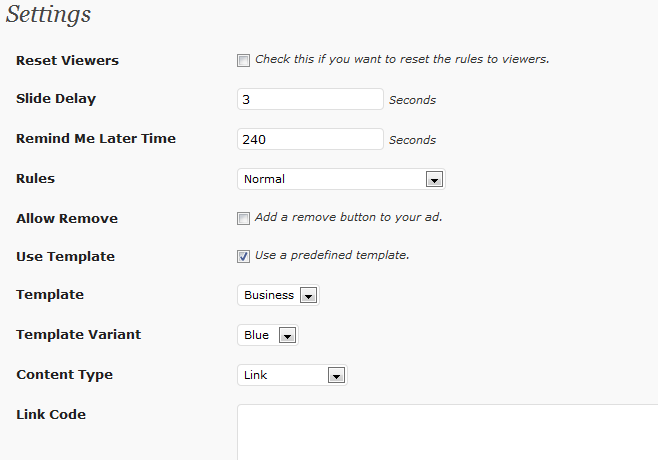
Slide Up Ads Settings
And a picture of the drop-down rules:-
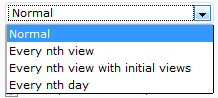
Slide Up Ad Rules

The colour picker if you’re using a plain background:-

Slide Up Ads Colour Picker

And the buttons that can be added to the slide up ad:-

Slide Up Ad Buttons

Note in that last image that there’s the usual X (which always appears on the ad), an optional minimise button which will allow the visitors to close the ad for a period you decide, and also an optional power button which will close the ad permanently until you use the “Reset Viewers” check box on the admin panel settings page.

That’s a plenty big plugin spec. 😉


-Frank Haywood
[br][br]

Posted by Frank Haywood in internet business

Attribution Copier Plugin

Update: The sale for the "Totally brilliant" Attribution Copier plugin is now live at just $10.00 until Sunday evening (27th).

Buy now

***

I’m very excited to be able to tell you about my WordPress plugin called Attribution Copier.

Unusually I’ve been installing this across *all* my sites.

I say unusually because there’re many plugins I have written for certain types of site I create. But this is one that is suitable across the board.

attribution-copier-04

Okay, what does it do?

Well, wouldn’t it be nice if when someone swipes some content from you to use on their own site that they’d also put in a link back to your site? Yes it would.

But most people don’t do this because either they don’t know how to (the majority), or it’s too much trouble to take those extra few moments to add a link.

You can imagine the situation – I’ve done this myself. I see something on a site I know a friend would be interested in or find amusing so I select and copy the text and stick it in an email and off it goes. Sometimes I’ll put a link back to the site if there’s other stuff on there that might be of interest, but most of the time I don’t.

I would be willing to bet you’ve done the same thing at some point. And there are lots of people out there that do their research on the internet and then compile a document or presentation with copy and pasted content.

Even my children do that for their homework. 😉

Well how about if you could *make* the people who copied your content give you a link back? Not in any forced intrusive way, they would just find the link back to your site automatically embedded when they do the copy and paste.

Now *that’s* cool isn’t it?

And that’s where the Attribution Copier plugin comes in. It does automatic embedding of a tag line and link back to your site whenever anyone copies your content.

attribution-copier-05

When you stop and think about this, because it’s likely that most people (the general public) don’t know how to add a link to content they’ve copied, then it’s likely that they also wouldn’t be bothered to remove it either.

And when you take curation into consideration then it gets even more interesting.

In case you didn’t know, curation is an increasingly popular method of building large sites with other people’s content that’s been copied and pasted. Many of the sites I’ve seen often don’t have links back to the source content. I don’t think this is intentional, I think it happens in haste.

(There have been times I’ve had to search for the text online in an attempt to find the original source.)

So I hope you can see how powerful and how totally useful this plugin is. 🙂

If you want to try this out then select some text from this post, copy and paste into a text document and you’ll now see there’s a link back to my blog in the text.

The sale is LIVE and will last until Sunday evening at just $10. The plugin will then rise to $27 after the sale is over.

-Frank Haywood

Posted by Frank Haywood in internet business