internet business

Sale – Slide UP Ads

Update: The sale for Slide Up Ads is now LIVE at just $17.00 and INCLUDES a full developer (client/flipper) licence.

Buy now

***

Here on my blog you’ve almost certainly noticed the Slide Up ad at the bottom of the screen and maybe even used it to become a subscriber – it’s a fixture here and there’s a very good reason for that.

Here are some examples from the supplied PSDs.  You can easily amend the background colours by use of a slider to give the hue you require, and you can change the icons/graphics by adding any one of the thousands of free icons available or your own images.

 

slideup-header-examples


You may be VERY surprised to know that when I first introduced it, then my subscriber sign-up rate increased by 249% in the first week.

By doing absolutely nothing extra to my blog other than installing this little tool, then since then I’ve dramatically increased the number of subscribers.

Here’s the feature set.

  • 79 pre-defined templates for the slide-ups
  • All Photoshop PSDs are supplied for all templates
  • Also included are no-text PNGs for use with any graphics editor
  • An easy to understand method of creating your own templates
  • An optional colour picker if you want a plain background slide-up
  • Autoresponder sign up code parsing and reformatting
  • Comprehensive rules system that governs when and how often the ad shows
  • THREE ways of visitors closing the ad, selectable by you
  • Two different “Content Types” for the ad – autoresponder and link/HTML
  • Finally, a way to reset the ad when you create a new one

I have proven beyond any measure of a doubt that putting a slide-up ad on my blog increased my mailing list sign-ups by 249% in the first week of use.  I know that sounds incredible, but it’s something that just can’t be ignored.

My stats for the 12 months leading up to the installation of the script were for approximately every 17 visitors, someone subscribed. I get a lot of repeat visitors who are already subscribed, so I’ve been okay with that figure of 17-1 and I thought it was pretty good for a blog.

But it turns out I was WRONG.  Big time wrong.

By using a slide-up I immediately pushed that number up to nearly 6-1.

After a week of use I found I was getting a new subscriber for every 6 or 7 visitors – that’s just under 2.5 times more subscribers for the SAME amount of visitors.

You have GOT to take notice of results like those, and it’s been one of the most amazing things I’ve seen. (That was when I then had my own bigger, better, Slide Up Ads plugin created.)

If you see the same kind of results as I did (and why not?) then for every 10 new subscribers you’ve been picking up from visitors to your sites, then suddenly you can push that number up to 25 from the same amount of visitors just by using this plugin.

Considering the industry standard rate that a subscriber to your mailing list can mean up to a dollar a month in income, then you have to ask yourself just what are you losing by not using it?

The special for the Slide Up Ads plugin will close without notice and is just $17…

The nearest competing product to it sells for $47, so this is a real bargain.

It’s worth a lot more to you than that though when you put it to good use.

Here’s a screen shot of part of the admin panel:-
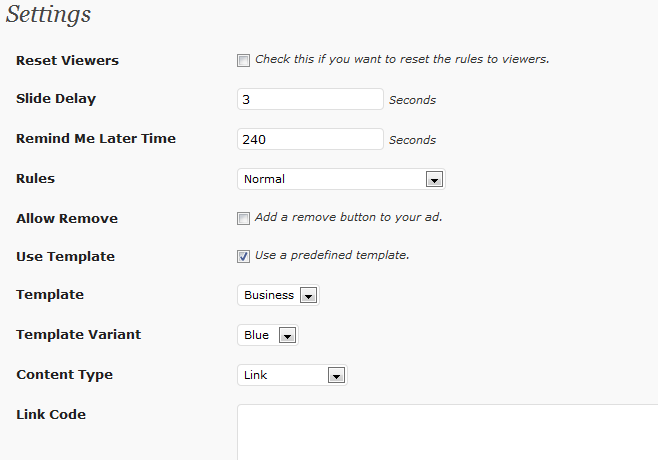
Slide Up Ads Settings
And a picture of the drop-down rules:-
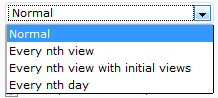
Slide Up Ad Rules

The colour picker if you’re using a plain background:-

Slide Up Ads Colour Picker

And the buttons that can be added to the slide up ad:-

Slide Up Ad Buttons

Note in that last image that there’s the usual X (which always appears on the ad), an optional minimise button which will allow the visitors to close the ad for a period you decide, and also an optional power button which will close the ad permanently until you use the “Reset Viewers” check box on the admin panel settings page.

That’s a plenty big plugin spec. 😉


-Frank Haywood
[br][br]

Posted by Frank Haywood in internet business

WP PLR Tutorials

There’s a link to a WP PLR tutorial site further down, but first…

I had an email from Ted G (hi Ted!) asking how to move the WordPress page tabs (the menu items that run along the top of the page).

I’ve been taking it for granted that everyone that uses WP knows this and I’m a dummy for doing so. Of course not everyone knows all the ins and outs (neither do I) and it’s stupid of me to make such a silly assumption.

I apologise for that assumption, and I’ve made a short video for Ted and everyone reading this who don’t know how to do it.

At the other end of the scale, another customer (hi Martin!) has created something that has blown me away.

He’s built a huge (and I mean MASSIVE) site of high quality WordPress training. (It’s something I’ve considered doing for a long time but I don’t think I need to do it now.)  It’s not just videos he’s created, but also lots of text and screenshots, diagrams and flow charts, infographics, the lot.

Better still, Martin has released all this with
Private Label Rights (PLR).

So now there’s two very cool aspects to this.

#1 – If there’re things about WP you want to learn, then this is the way to do it, there’s no two ways about it. And as a sideline you could set up your own tutorial service too.

#2 – If you already sell WordPress products or services then these are ideal to provide to your customers.

For example, let’s say you have offline clients that you’ve set up WP site for, and they’ve asked about how to use it.

You could spend a lot of your own time showing them what to do.

Or you could give them access to the training material that “your team” has put together for you.

Either way you get to charge them for it.

I know I’d be VERY hard pushed to go to the level of detail that Martin has and this is something that is well worth checking out.

I’m talking about tutorials with WordPress training videos, HUNDREDS of screenshots, diagrams and flowcharts, infographs, links to resources, links to related tutorials, PLUS blog posts, training emails, updates and additional training content.

It’s a VERY cool deal and you can get to it here.

-Frank Haywood

Posted by Frank Haywood in internet business

Google Fonts in WordPress

I’m feeling a bit over-excited at the moment because I can now add any Google font to any page or post on my blog.  I just checked and as I write this there are 629 web fonts available in the Google font library.

I have a small sub-set of those installed here on my blog and I’d like to show a selection of those to you here as I feel these are amongst the most useful when writing.

Please note that these are all TEXT and NOT GRAPHICS.

You can swipe across them and copy the content to test it out if you don’t believe me.  😉

Architects Daughter

Bangers

Chewy

Gloria Hallelujah

Henny Penny (Harry Potter I reckon)

Indie Flower

Knewave

Kranky

Love Ya Like A Sister

Permanent Marker

Rock Salt

Slackey  (this looks like the SpongeBob font)

Special Elite  (a typewriter style font – very nice)

I like to think you’d agree with me when I say this is pretty amazing.

Most important though is it’s incredibly easy to use and to add new fonts.

If you want to be able to do this too, then you need this:-

http://www.frankhaywood.com/wso-10ssp/

-Frank


Posted by Frank Haywood in internet business, software, Templates, wordpress plugins

Page Templates PTP101-PTP110

Update: The sale at $17.00 for the Page Template plugin plus 10 BRAND NEW page templates is now live. Included in this sale only is a client flipper licence.

Buy now

***

Today at 6.00pm GMT I’m releasing 10 brand new never-before-released page templates for the Page Template Plugin.

These are all very clean and attractive designs and come with the latest version of the Page Template Plugin (v1.0.5) which has had a minor bugfix.

(Start the video and then switch to 720p and full screen.)

If you’ve never heard of or seen the Page Template Plugin, then in a nutshell it’s a very elegant solution to adding pre-designed sales and squeeze pages to your WordPress driven sites.

Because it’s a plugin, then in 99% of cases it will work with your favourite theme and digital delivery solution.

This means you can build sites using a theme you like, plus a digital delivery or membership solution that you’re happy with, and set up independent sale and squeeze pages that don’t look like the theme.

In my view this is a better solution than using an all-in-one theme to create sales pages on your site.

Using the Plugin after Installation

Because these pages are all pre-designed for you, then you don’t even need any design skills.  😉

I’ve uploaded the templates and created some demo pages for you to see each of the templates here:-

http://60secondsalespages.com/ptp101/
http://60secondsalespages.com/ptp102/
http://60secondsalespages.com/ptp103/
http://60secondsalespages.com/ptp104/
http://60secondsalespages.com/ptp105/
http://60secondsalespages.com/ptp106/
http://60secondsalespages.com/ptp107/
http://60secondsalespages.com/ptp108/
http://60secondsalespages.com/ptp109/
http://60secondsalespages.com/ptp110/

Given that it can cost you an average price of around 47-67 dollars for a custom design that won’t even work with WordPress, I’m sure you can see this is a fantastic bargain and not one to be missed.  After the sale is over, each of these designs will be available for $5 apiece so if you want the best price, now is the time to get them.

Just $17. 🙂

-Frank Haywood

Posted by Frank Haywood in internet business, software, wordpress plugins

Mobile / Responsive – Some Thoughts

I’ve just answered an email asking about responsive themes, and I thought it would be a good idea to post my answer here too.  I was asked if any of my themes were responsive, and this is my reply.

separator

No they aren’t I’m afraid.  It’s a difficult thing to do and it’s often an unsatisfying result I find.

If you look at how YouTube have approached it recently, it’s ticked off a lot of people including my eldest son and his friends, who have had custom page templates designed in the past that were meant for a desktop based web browser rather than mobile.

What I’d like to see is a dual hit method where a theme presented the regular desktop appearance when viewed with a desktop browser, and something much simpler when viewed with a mobile device.  And there’s another problem, because what resolution do you define as mobile?  Cell phones – yes.  Tablets – hmm, maybe, oh okay yes then.  But what size tablet would you serve the mobile view?  My Kindle Fire HD is a 7 inch device but has a resolution of 1280×800.

Viewing “normal” web browser page is a little difficult because it’s only a 7 inch display, and a mobile view of sites would suit it better.  In contrast the monitor sitting next to me is a 19 inch device with a resolution only a little better than my Kindle at 1360×768, but viewing a mobile page on it would just be silly.  😉

And…  Cell phones will soon have (if they haven’t already) very high resolution displays but still tiny screens to show content.  What view do you serve them? Or do you just serve the same content to all devices and let the device sort it out?

That doesn’t work because of the resolution issue I discussed above.

*sigh*

I guess that eventually someone (it might be me) will come up with a clever (and simple!) solution, but it seems for now that we’re either stuck with normal desktop browser views, or responsive where everything moves around to occupy a different layout depending on the resolution of the device.  Neither is a very good answer.

It seems the only way to do it to make everyone happy is to have a number of different page views depending on device rather than on screen resolution.  You can sort of guess this by browser and OS, but sometimes it’s going to be wrong.

If you go to Starbucks.com on your desktop browser and then gradually narrow the browser you’ll see how the site adjusts, stacking images underneath each other.  That’s okay, but their site has had to be designed VERY simplistically and blockish for this to work.

Hands in air, right now I don’t know how to approach this but I guess at some point with some thought I’ll come up with something.

-Frank Haywood

Posted by Frank Haywood in internet business