internet business

Project Email Part 2

As I said yesterday, today I’ve created a short video showing how you can enable email authentication on your domain with cPanel hosts. It’s very easy to do in a couple of clicks, but if you don’t have cPanel then I guess you can ask your web host to enable it for you.

Start the video then change quality to 720p and go full screen.

Why should you do this?

Simple. Email is increasingly becoming REPUTATION based.

In the past there were systems set up called blocklists which in essence were just a big list of bad IP or email addresses that were used by known spammers. Except these lists have always been rubbish and poorly maintained (the trouble is many ISPs and free email providers still rely on them).

But there’s something better now that’s been widely accepted (the chances are you haven’t joined the party yet) and that’s email authentication.

This system relies on you enabling a couple of things on your server that authenticate email coming in (DKIM) and also going out (SPF) to make sure the email is from who it says it is and not from a spammer.

The SPF part of it makes sure that the receiving server can check to see if the email really did come from you. Over time this will improve your reputation so that the ISPs and email providers are more willing to accept email from you even if the odd user marks it as spam. (A whole topic in itself.)

So this stuff is quite important to know for any small business owner – I wouldn’t be bringing it up if it wasn’t.

IF you’re thinking of leaving a comment on this post with your thoughts, then all I’ll say is that’s a good idea and it’s DEFINITELY in your interest to do so as I’d like to later reward all contributors for their input and views.  😉

-Frank Haywood


http://www.frankhaywood.com/tag/project-email/ <== Click this for a list of all Project Email posts.

Posted by Frank Haywood in internet business

Project Email Part 1

If you use email at all then I expect you’ll find this useful.  😉

This series of blog posts, videos and emails will eventually become part of a saleable product so pay attention if you want to see how I go about creating a learning product. Then you can use this methodology as a guide for your own product creation.

Start the video then change quality to 720p and go full screen.

Gradually over time there have arisen some situations related to email that I think need to change. I’m certain that the changes I’m going to discuss in this series of blog posts and emails will prove to be a substantial improvement of your business situation.

This will arise from both different methods of handling email that you may not be doing at the moment, and also with your email marketing – autoresponders.

So let’s get started with a discussion about email clients and then we’ll move onto autoresponders.

I’ve noticed over the last 6 months or so that an increasing number of small business are using free email services such as Yahoo, Hotmail, Gmail.

I don’t think this is a good idea for two reasons.

#1 – It looks unprofessional to your customers to be receiving a business email from fredbloggs @ yahoo.com, or studly111111 @ gmail.com etc.  😉

#2 – You don’t own the email account, the free email provider does. And they can close you down any time they like.

Ask yourself what it would do to your business if a spam complaint resulted in your free email account being closed.

Nightmare?

Consider Gmail.

Yes we all have Gmail accounts but only because we have to if we want to use any of the Google services such as YouTube, GDrive or Gdocs.

But… Google have a history of closing without warning any service they lose interest in.

They did it with a really useful online graphics editor a couple of years ago, and more recently they closed their RSS reader service too, annoying a whole load of techies out there.

Email could be next if new legislation requires a tax on email addresses, or makes free email addresses illegal to prevent the increasing amount of spam. I don’t think that last one would be a bad thing, and sooner or later a politician is going to have that idea too.

To the public it wouldn’t be a big deal. They’d use their ISP email addresses instead.

But as a business owner, you should *really* be taking charge of your own email and not trust it to chance.

I’d also like you to consider that many free email providers don’t care if the email gets to you or your clients and customers or not. It simply isn’t critical to them. What do they care if they filter 2 million emails out of their network today and yours happens to be one of them?

As far as they’re concerned they’re providing free not business email services, and you can’t afford to rely on them as part of your business.

So learning point number 1 is:-

You shouldn’t rely on free email services as part of your business.

All make sense so far?

In a couple of days or so I’ll show you how *easy* it is to set up an email account within cPanel, and also set what are called DKIM and SPF records – very important!

Now then. To make this whole exercise doubly useful, I’ve created a first video – an overview that explains how I’m going about creating the learning product and what it’s going to be about and where it’s leading to. And iot also explains a lot of things not covered in this email.

If you watch the video and like it, then feel free to give me some love back by sharing and even embedding it on your own site. And of course let me know what you think by leaving me a comment on the post.

IF you’re thinking of leaving a comment on this post with your thoughts, then all I’ll say is that’s a good idea and it’s DEFINITELY in your interest to do so as I’d like to later reward all contributors for their input and views.  😉

-Frank Haywood


http://www.frankhaywood.com/tag/project-email/ <== Click this for a list of all Project Email posts.
Posted by Frank Haywood in internet business, list building, Product Ideas

Subscribers Only Plugin

Update: The sale starting at $10.00 for the first 25 copies of the Subscribers Only plugin for WordPress is now live. Included as part of this sale only is a full developer (client/flipper) licence.

Buy now

***

Today at 6.00pm GMT, I’m running a sale for a very cool little plugin called Subscribers Only. It’s designed to boost the number of WP subscribers to your self-hosted WordPress blogs and I’m going to be using it quite a lot very shortly to do just that.

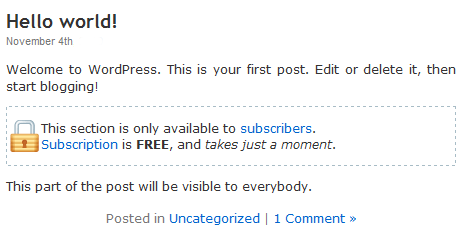
When a visitor views a page or post with protected content on it then they’ll see something like this:-

so-09

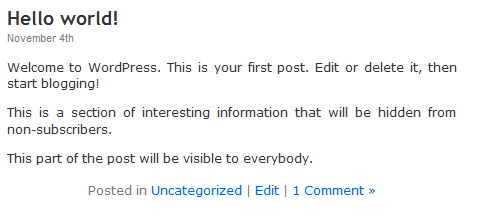
In the screen shot above they can see the first section and the last sentence. In order for them to see the hidden content in the middle then they have to subscribe by following one the links. They’ll then see what they couldn’t see before:-

so-08

Is that cool or what?

It’s very easy to set up too, just a little bit of copy and paste.

so-07-600x370


More subscribers means more customers.

THE most important thing we have to do as business owners is gather subscribers names and email addresses, and many of us have an autoresponder setup of some sort to help us with that.

An “out of the box” WP installation supports the idea of subscribers to your blog – let’s call them WP subscribers to differentiate them from autoresponder subscribers.

This plugin directly helps you to add more WP subscribers to your blogs. Once they’re there, then you can export and import into your autoresponder. (There’s more I want to talk about that quite soon too – it’s all change and there’s some exciting stuff coming your way.)

Anyway…

Getting WP subscribers can be a little bit of a problem for most people – you need to give visitors a real incentive to become WP subscribers, and many site owners aren’t sure of the best way to do this.

WP sort of helps you to do this by including an option where you can only allow people to leave a comment if they first register as a WP subscriber.

But all that seems to do is is stop people from leaving a comment altogether unless it’s really in their interest to do so.  A lot of blog owners are using this to prevent spam, so it’s not really working as it was originally intended.

Now wouldn’t it be good if you had a method of getting people to subscribe in order to read your posts? Sort of like a WordPress Membership. But the only problem with that is somehow getting people enthusiastic enough to subscribe, especially if they can’t read ANYTHING until they do.

There’s no way of them sampling your articles first, and of course if everything is hidden behind a membership, then you lose all the nice SEO effects of having plenty of content on your site.

What you really need is a method of hiding some of the content so that people can read part of an article, get hooked in, and then only be able to read the juicy bits by first becoming a subscriber.

Aha!

This concept is DYNAMITE.

Imagine this.

You write a post or a page that explains how important it is to do something – the WHY – but then leave out the crucial bit that explains the method of doing it – the HOW.

All they see is a message saying something like “This content is for Subscribers Only”.

Get it?

The only way that people can read that missing content is if they follow the link and join as WP Subscribers, then once they’re logged in they can see all the hidden content.

Do you see the power of that?

Anybody that’s read the first half of an article will almost always want to read the second half. In fact you don’t even need to withold half the content, you can do it with just a paragraph as long as it has the information in that they want to know about.

And inquisitiveness is an incredibly powerful feeling – we all know the phrase “curiosity killed the cat”.

The entire human race is hard wired with curiosity built in. The Subscribers Only plugin taps into that curiosity and gets people to subscribe to your blog.

The sale for the Subscribers Only plugin goes live today, Sunday 8th September at 6.00pm GMT (1.00pm EST) and will run for 48 hours.

The first 25 copies are just $10 with a price increase after that so the faster you get in the lower the price you’ll pay.


-Frank Haywood

[br][br]

Posted by Frank Haywood in internet business

Comment Reward Summer Sale

#1 – It increases the number of REAL comments on your blog.
#2 – It improves your SEO by adding more user driven content.


As you might think from the name, the Comment Reward plugin rewards people for leaving comments on your blog, by sending them an email they will really WANT to receive.  😉

comment-reward-04

Why would you want to do this?

You know how people only go certain places because other people go there?  And the only thing that makes the place popular is because – people go there – it’s a self fulfilling prophesy if you like.

Once the buzz is going, it doesn’t stop.

Just like real locations in the real world, a busy blog means more interest. The more interest you have, then the busier your blog. Makes sense doesn’t it?

I used to be a big fan of certain pubs just because they ran “happy hours” between 6-7 to liven things up a bit. My reward was cheaper beer. (Sadly, happy hours have since been outlawed in the UK…)

Just like real world promotions, if you reward your visitors, then they’re more likely to come back and make your blog look busy to other visitors.

What your visitors won’t find out until they leave a comment of their own is that you’re rewarding them for their comments by using the Comment Reward plugin.

They will get a welcome email from you which could contain some useful information, and could also have a link to a downloadable freebie.

You can create many of these reward emails depending on how many comments your readers leave and even tell them when the next reward will be available to them just to encourage them to leave more comments.

comment-reward-03
Once people know what’s going on the plugin virtually compells them to come and make comments on your blog. And if other people see your blog is busy because of all the comments, it encourages them to join in too.

More visitors, more comments, busier blog, more comments. People come back.

And so it goes round and round.

The result?

A really busy blog. More returning visitors, raving fans, and subscribers too if your offer is good enough.

Because let’s face it, someone might be okay with leaving a comment to begin with, but they might not want to subscribe to your mailing list.

However, if you reward them for their comment then they’re much more likely to be okay with signing up to your mailing list, especially if you make them a really good offer (more on this another time).

Do you want that?

You can get yourself going in the right direction just by installing the Comment Reward plugin.

The Comment Reward plugin is just $17 until 31st December 2014.


-Frank Haywood

Posted by Frank Haywood in internet business, software, wordpress plugins